Tired of your primary inbox being flooded with spam after every online signup? A temporary email for signup acts as a protective shield, giving you a disposable address to use for websites, apps, and promotions. This simple strategy drastically cuts down on unwanted marketing emails, minimizes your risk of data breaches, and helps you avoid phishing scams, all while keeping your real identity and personal correspondence private and secure.
Let’s be honest: signing up for anything online today feels like handing out your digital home address to every stranger on the block. You want that free e-book, that discount on your first order, or access to a webinar, and the price is your email address. What happens next? Your inbox, the one you use for bills, family, and real work, slowly but surely gets invaded. Promotions from a store you bought from once. “News” updates you never asked for. And worst of all, the chilling possibility that your email, now on a leaked database, becomes a key for hackers to try and unlock your other, more important accounts. There’s a simple, powerful tool to stop this cycle: a temporary email for signup. It’s not a magic bullet, but it’s one of the most effective, underused strategies for taking back control of your online privacy and security.
Think of your primary email address as your digital passport. It’s tied to your identity, your finances, and your most sensitive communications. You wouldn’t hand your passport to a random vendor at a market for a free sample, right? Yet, we do the digital equivalent every single day. A temporary email for signup is like using a guest pass or a disposable alias. It gets you in the door for that one interaction, and then it can be thrown away, leaving no trace back to your real “passport.” In this guide, we’ll dive deep into exactly how this works, why it’s crucial in 2024, and how you can use it smartly to stop spam and fraud in its tracks.
Key Takeaways
- Primary Defense: A temporary email for signup is your first line of defense against spam, marketing overload, and potential fraud targeting your primary identity.
- Privacy Preservation: It separates your online activities from your real identity, preventing data brokers and malicious actors from easily linking your behavior to your personal inbox.
- Fraud Mitigation: By not exposing your main email, you significantly reduce the attack surface for phishing, credential stuffing, and identity theft attempts.
- Convenience & Control: You gain immediate access to gated content or trial offers without long-term commitment, and can simply discard the address when its purpose is served.
- Not for Everything: Critical accounts (banking, primary cloud storage, main social media) must always use a secure, permanent, and well-protected personal email address.
- Provider Choice Matters: Select a reputable temporary email service that offers adequate inbox retention time, HTTPS security, and a clear privacy policy.
📑 Table of Contents
- How Does a Temporary Email for Signup Actually Work?
- The Core Benefits: Why You Need a Disposable Address
- Ideal Use Cases: Where to Use Your Disposable Address
- Critical Don’ts: What You Should NEVER Use a Temporary Email For
- How to Choose the Right Temporary Email Service
- Best Practices for Safe and Effective Use
- The Future of Privacy: Temporary Email in a Tracking World
- Conclusion: Take Back Control, One Disposable Address at a Time
How Does a Temporary Email for Signup Actually Work?
The concept is beautifully simple, but the technology behind it is robust. A temporary email for signup service provides you with a random, unique email address that exists for a short, predefined period—usually anywhere from 10 minutes to 48 hours. This address is fully functional; it can receive emails just like a normal inbox. The magic is in its impermanence and its isolation.
The Generation Process: Randomness and Anonymity
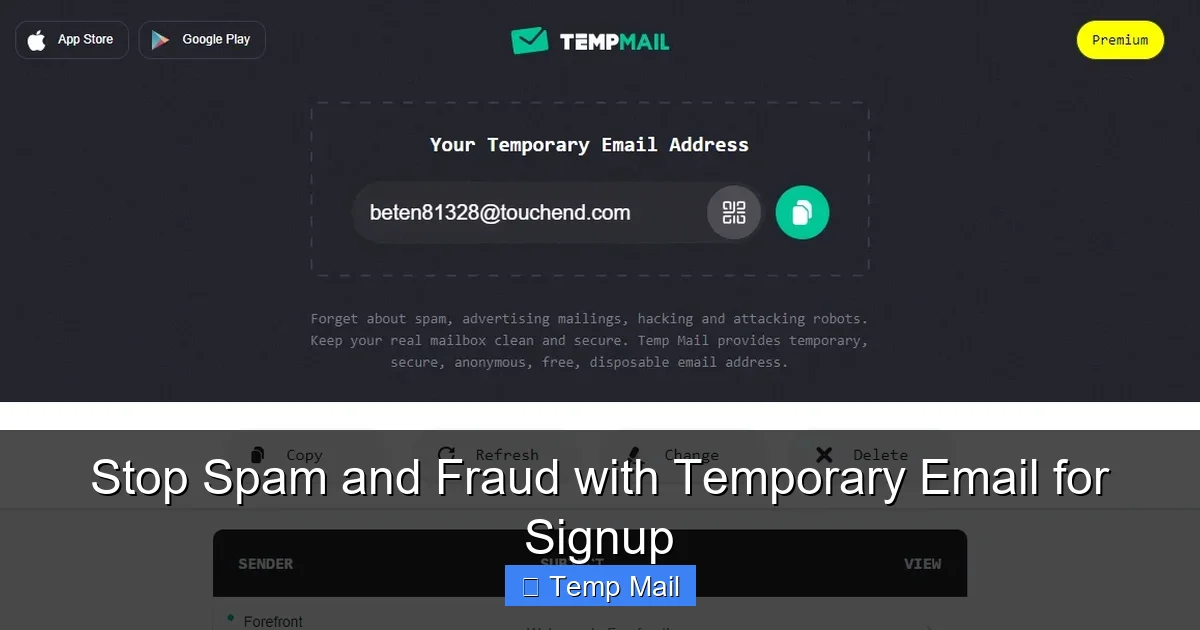
When you visit a service like Temp-Mail, 10MinuteMail, or similar, the system instantly generates a new email address for you. This address is typically a random string of characters (e.g., [email protected]). There is no registration, no password, and no personal information required to create it. The service’s server creates a new, isolated inbox linked solely to that random string. You copy this address and paste it into the signup form for the website or app you’re accessing. Any verification emails, newsletters, or promotional messages are delivered to this temporary inbox, which you can view on the service’s website in real-time.
The Inbox Lifespan: A Countdown to Cleanup
From the moment the address is generated, a clock starts ticking. The service automatically deletes the inbox and the email address itself after the set time expires. This could be 10 minutes after you receive the last email, or 24 hours after creation. This automatic purge is the core feature. It means that once the address is gone, any spam sent to it bounces back uselessly. Any data breach that includes that email is now irrelevant because the address no longer exists. The connection between that online interaction and your real identity is severed forever.
The Receiving Mechanism: No Setup Required
You don’t need to configure any POP3 or IMAP settings. The entire process happens through a web interface. You go to the temp mail site, see your randomly assigned address, and an inbox window that updates live. If a website sends a “confirm your email” link, you click it right there in the temporary inbox. It’s seamless. This lack of setup is what makes it so accessible for one-off signups. You are a passive recipient; the service handles all the server-side mail routing and storage temporarily.
The Core Benefits: Why You Need a Disposable Address
Using a temporary email for signup isn’t just about avoiding a cluttered inbox; it’s a fundamental privacy and security practice. The benefits stack up quickly, affecting your digital hygiene, your security posture, and even your peace of mind.
Visual guide about Stop Spam and Fraud with Temporary Email for Signup
Image source: anonymmail.net
Benefit 1: Annihilating Spam and Marketing Overload
This is the most obvious and immediate benefit. That “free shipping” offer you signed up for? They’ll sell your email to partners. That forum you wanted to lurk on? They’ll email you weekly digests. By using a disposable address, you funnel all that potential spam into a digital black hole that self-destructs. Your primary inbox remains a sanctuary for emails from people you know and services you genuinely, actively use. You are no longer a product; you are in control of who gets to talk to you.
Benefit 2: Creating a Critical Barrier Against Fraud and Phishing
Phishing emails are the leading cause of data breaches. They often use your own email address against you, making the email look familiar (“Your Apple ID was used to sign in…”). If that phishing attempt targets an email address tied to your bank account, you might be tricked. If it targets a temporary email for signup you used for a random game site, you instantly know it’s fraudulent because you have no legitimate business with that sender. This context is a powerful filter. Furthermore, in a data breach, leaked temporary emails are worthless to hackers trying to pivot to your real accounts, as they cannot be traced back.
Benefit 3: Preserving Your True Online Identity
Data brokers build profiles on you by aggregating your activity across the web. One of the easiest ways to do this is by tracking your email address across different websites. If you use the same email everywhere, you create a single, unified profile that is incredibly valuable. Using a unique, disposable address for each new website or service fragments your digital footprint. It makes it exponentially harder for any entity to build a complete picture of your interests, location, purchasing habits, and online behavior. You regain anonymity where you want it.
Benefit 4: Bypassing Gated Content Without Commitment
How many times have you wanted to read an article, download a template, or watch a video, only to be stopped by a “subscribe to our newsletter” wall? A temporary email for signup lets you bypass these gates instantly. You get the content you want immediately, with zero commitment. No worrying about unsubscribing later (which often doesn’t work anyway). No long-term marketing drip campaigns. It’s a “take and leave” strategy for content you need once.
Ideal Use Cases: Where to Use Your Disposable Address
Knowing *when* to use a temporary email for signup is as important as knowing how. It’s a tool for specific scenarios, not a replacement for your core digital identity. Here are the prime candidates for a disposable address.
Visual guide about Stop Spam and Fraud with Temporary Email for Signup
Image source: temp-email.io
One-Time Downloads and Lead Magnets
This is the classic use case. You see a “Free Instagram Marketing Checklist” or a “10-Step SEO Audit PDF.” The provider wants your email in exchange. Use your temporary address. Download the file, and forget about it. The likelihood of that company sending you genuinely valuable, non-spammy information is low. Protect your main inbox from this probable future spam stream.
Signing Up for New Apps and Services (The Trial Phase)
Want to try a new project management tool, a graphic design app, or a streaming service with a free trial? Often, they require an email to create the account. Use the disposable address for the initial signup and trial period. If you decide you love the service and want to keep it long-term, you can usually add your permanent, primary email later within the account settings. This way, you only commit your real email to services you have vetted and intend to use.
Accessing Forums, Commenting on Blogs, or Online Communities
You have a strong opinion on a news article or want to ask a question in a technical forum. These platforms often require an email to prevent spam bots. A temporary address is perfect here. It verifies your account for that single interaction or series of comments, but it doesn’t tie your decades-old personal email to a potentially contentious public post. It adds a layer of plausible deniability and protects your long-term reputation.
Entering Online Contests and Sweepstakes
“Win a new iPhone!” These are notorious for harvesting emails. The prize is often worth far less than the value of the email list they build and sell to marketers. Using a temporary email for signup here is a no-brainer. You get a chance to win without selling your contact info to a dozen marketing companies. Just remember, if you actually win, they’ll need a real way to contact you, so you might miss out. But the odds are overwhelmingly in favor of the spam list.
Testing Website or App Functionality
If you’re a developer, designer, or just a power user testing signup flows, you need multiple email addresses. Creating dozens of Gmail or Outlook accounts is a hassle and clutches your real identity. Temporary email services allow you to generate as many unique addresses as you need, instantly, to test email verification, password resets, and notification systems without any personal involvement.
Critical Don’ts: What You Should NEVER Use a Temporary Email For
The power of a temporary email for signup comes with a crucial limitation. It is a disposable tool, not a secure vault. Using it for the wrong purposes can lock you out of important accounts or create security nightmares. Here is your definitive “do not use” list.
Visual guide about Stop Spam and Fraud with Temporary Email for Signup
Image source: wallpaperaccess.com
DO NOT Use for Primary, Long-Term Accounts
This is non-negotiable. Your email for banking, investment accounts (like PayPal, Coinbase), your primary cloud storage (Google Drive, iCloud, Dropbox), your main social media profiles (Facebook, Instagram, Twitter/X), and your primary Apple/Google/Microsoft ID must always be a secure, permanent email address that you control and monitor religiously. If you use a temporary address for these and the inbox expires, you will be permanently locked out, often with no recourse. Recovery becomes impossible.
DO NOT Use for Account Recovery or 2FA
Many services use your email as the primary way to reset a forgotten password or receive two-factor authentication (2FA) codes. If your recovery email is a temporary address that disappears, you have no way back into your account if you get locked out or forget your credentials. The recovery email must be as stable and permanent as the account itself.
DO NOT Use for Professional or Business-Critical Communications
You should never give a client, employer, or important contact a temporary email address. It appears unprofessional and unreliable. If you need a separate email for business, create a proper, permanent alias or a dedicated business account with a reputable provider. A temporary email for signup is for interacting with anonymous entities on the web, not for building human relationships.
DO NOT Assume 100% Anonymity or Security
The service provider itself can, in theory, see the emails passing through their system. You are trusting them not to log or sell that data. While reputable services have privacy policies, it’s not an encrypted, zero-knowledge system like ProtonMail. Do not use a temporary email for highly sensitive whistleblowing, confidential legal communications, or anything where your anonymity is legally critical. For that, you need proper encryption and Tor.
How to Choose the Right Temporary Email Service
Not all temporary email for signup services are created equal. Some are bloated with ads, some have short lifespans, and some may even have malicious intent. Here’s what to look for when selecting a provider.
Key Criteria: Retention Time, Security, and Usability
The first factor is the inbox retention period. For most signups, 1-2 hours is sufficient to receive a verification email. For trials that might require a weekly newsletter, look for 24-48 hour retention. Ensure the site uses HTTPS (the padlock in your browser). A clean, simple interface is a plus—you don’t want to fight pop-ups just to copy an address. Check if they offer multiple domain options (e.g., @tmpmail.org, @tempmail.net), which can help if a specific site blocks a known temp mail domain.
Top Recommended Features
Look for services that allow you to manually refresh the address if you need a new one without closing the page. The ability to “reply” to emails from the temporary inbox is a rare but useful feature for some verifications. A clear, prominent “Delete Inbox” button gives you manual control. Avoid services that require you to solve endless CAPTCHAs or aggressively push browser extensions you don’t need. Simplicity and speed are key.
Red Flags to Avoid
Steer clear of any service that asks for personal information to “generate” an address. That defeats the entire purpose. Be wary of sites with excessive, misleading download buttons for “software” that is just adware. If the site design is shoddy and filled with “You won a prize!” pop-ups, close it. Your security is not worth the risk. Stick to well-known, established names in the temp mail space that have been around for years and have transparent operations.
Best Practices for Safe and Effective Use
To get the most out of your temporary email for signup habit while staying safe, follow these best practices. They turn a simple trick into a disciplined part of your digital hygiene routine.
Practice 1: Use a Dedicated Browser or Profile
For the ultimate layer of separation, consider using a different browser (e.g., Firefox for personal, Chrome for disposable signups) or a dedicated browser profile/container. This prevents cookies and tracking from the sites you visit with your temporary email from potentially cross-contaminating your main browsing session where you’re logged into your bank or email. It’s a low-effort way to contain digital spillover.
Practice 2: Never Use the Same Temp Address Twice
The power is in uniqueness. If you use the same temporary address for multiple signups, you’ve just created a new “primary” address for spam. Once you’re done with a signup, close that tab or window. If you need to sign up for something else later, generate a brand new temporary address. This ensures each spam stream is isolated and dies with its own inbox.
Practice 3: Have a Mental “Permanent vs. Disposable” Checklist
Create a simple mental rule before you paste any email into a signup form. Ask yourself: “If I lose access to this account, will it cause me serious financial loss, professional harm, or lock me out of critical data?” If the answer is yes, do not use a temporary email. If the answer is no (it’s a free tool, a content download, a forum), then proceed with the disposable address. This quick 2-second check prevents catastrophic mistakes.
Practice 4: Monitor Your Main Inbox for “Recovery” Emails
Sometimes, a service you signed up with a temporary email might send a “We miss you!” or “Update your subscription” email to that address before it expires. If you care about that service, you’d need to act. Since you likely won’t check the temporary inbox after leaving the site, you might miss an important notification. For services you think you might want to keep, consider adding your permanent email as a secondary contact *after* signing up, before you abandon the temporary one.
The Future of Privacy: Temporary Email in a Tracking World
As online surveillance and data harvesting become more sophisticated, tools like the temporary email for signup are not just convenient—they are becoming essential for the privacy-conscious user. We are moving towards a future where your email is the master key to your digital life, and protecting it is paramount.
Email as the Central Identifier
Despite the rise of social logins (Sign in with Google/Apple), the email address remains the universal username. It’s the one piece of data that connects your accounts across countless platforms. Protecting this central identifier is the single most effective thing you can do to limit your digital shadow. Temporary email services directly attack this by providing a series of rotating, disposable identifiers for low-stakes interactions.
Integration with Password Managers and Privacy Suites
Forward-thinking password managers like 1Password and Bitwarden are beginning to integrate alias generation features (e.g., “masked email” with Fastmail or Apple’s Hide My Email). These are essentially branded, more permanent versions of a temporary email for signup, but managed within your security vault. Expect this trend to grow, with more services offering built-in, forwardable aliases that combine the convenience of temp mail with the reliability of a paid service.
Regulatory Pressure and User Awareness
Laws like GDPR and CCPA have started to give users more rights over their data, but enforcement is patchy. The most powerful tool remains individual action. As more users adopt practices like using disposable emails for signups, the value of mass-collected email lists decreases. It creates a market signal that indiscriminate data harvesting is becoming less profitable. Widespread use of temporary emails is a form of passive resistance against the “data is the new oil” economy.
Conclusion: Take Back Control, One Disposable Address at a Time
Your email address is more than just a communication tool; it’s a key to your digital identity, a gateway to your attention, and a target for those who would exploit it. The humble temporary email for signup represents a profound shift in power dynamics. It’s a simple, free, and incredibly effective way to say “no” to the default model of online exchange, where you give away your personal details for trivial access.
Start today. The next time a website asks for your email to read an article or download a PDF, pause. Open a new tab, generate a temporary address, and use it. Experience the quiet satisfaction of knowing that your primary inbox will remain untouched. That promotional spam will vanish into a void. That potential data breach is now linked to an address that no longer exists. You are not being paranoid; you are being prudent. You are building a moat around your digital life. In the ongoing battle against spam, fraud, and invasive tracking, a temporary email for signup is one of the sharpest, most accessible weapons in your arsenal. Use it wisely, and reclaim your peace of mind.
Frequently Asked Questions
Is using a temporary email for signup legal and safe?
Yes, it is completely legal and a safe practice for its intended purpose of protecting your primary identity. However, safety depends on the provider’s security (use HTTPS sites) and your own discipline in not using it for critical accounts. It is not safe for banking or primary service accounts, as you could be locked out.
Can I receive attachments with a temporary email?
Most reputable temporary email services do allow you to receive attachments, including common file types like PDFs, images, and documents. However, there are often strict size limits (e.g., 10-25MB). You should always treat attachments from unknown senders with caution, even in a temporary inbox, as they could contain malware.
What happens if a website I signed up with a temporary email requires a password reset later?
This is a major risk. If you need to reset a password for an account you created with a temporary email and you no longer have access to that inbox, you will likely be unable to recover the account. This is why you should only use disposable addresses for accounts you do not intend to keep long-term or that have alternative login methods (like social login).
Do temporary email services store or sell my data?
Policies vary. Reputable services state they do not log IP addresses or store emails after the inbox is deleted. However, you are trusting a third party with the emails you receive. For highly sensitive information, never use a temp mail service. Always review the privacy policy of the specific service you choose. The business model is often ads on their site, not selling your email content.
Can a website detect that I’m using a temporary email address?
Yes, many can and do. Websites maintain lists of known temporary email domains and will block signups from them. This is why services that offer multiple domain options or frequently rotate domains can be more effective. If your signup is rejected, try generating a new address from a different domain on the same service.
Should I use a temporary email for social media or gaming accounts?
Generally, no. Social media accounts are long-term, tied to your identity and social graph, and often used for account recovery on other sites. Gaming accounts may have purchased games or items linked to them. These are “permanent” category accounts. Use your secure, primary email for these. Reserve the temporary email for throwaway interactions.