Fast temporary email services provide an instant, disposable inbox that shields your primary email from spam, data breaches, and unwanted tracking. They operate in seconds, requiring no registration, and automatically delete messages after a short period. This blend of speed and security makes them essential for safely accessing gated content, testing services, and maintaining digital privacy without long-term commitment.
Let’s be honest: your primary email address is a golden ticket to your digital life. It’s the key to your bank alerts, social media, work communications, and password resets for everything. Yet, we constantly throw it around online—typing it into sketchy forum sign-ups, one-time offer pages, and random download forms. What if there was a way to say “yes” to that free ebook or beta test access without handing over the keys to your kingdom? Enter the world of fast temporary email. It’s not just a convenience; it’s a fundamental tool for modern digital hygiene, offering a powerful one-two punch of blistering speed and serious security. This article will unpack exactly why this simple service is a must-have for anyone who values their online privacy and sanity.
Key Takeaways
- Instant Access: A fast temporary email address is created and ready to use in under 5 seconds, with no personal details or passwords required.
- Enhanced Privacy: It acts as a protective shield, preventing companies from linking your online activity to your real identity or primary email.
- Spam Elimination: By using a disposable address for sign-ups, you keep promotional and phishing emails out of your permanent inbox forever.
- Security Layer: Reduces risk in data breaches; if a site is hacked, only the temporary address is compromised, not your main accounts.
- No Long-Term Commitment: Inboxes self-destruct after 1-24 hours, ensuring no lingering digital footprint or need to manually delete accounts.
- Versatile Utility: Perfect for downloading whitepapers, accessing forum content, testing app registrations, and bypassing paywalls legally.
- Provider Selection Matters: Choose services with clear privacy policies, no logs, and reliable uptime to ensure both speed and true anonymity.
📑 Table of Contents
- What Exactly is a Fast Temporary Email Service?
- The Unbeatable Speed Advantage: Saving Precious Time
- How Fast Temporary Email Bolsters Your Security & Privacy
- Practical, Real-World Use Cases You Need to Know
- Choosing the Right Fast Temporary Email Provider
- Best Practices and Crucial Limitations to Remember
- The Future of Ephemeral Communication and Your Digital Life
- Conclusion: Speed and Security, Together
What Exactly is a Fast Temporary Email Service?
At its core, a temporary email service provides you with a random, disposable email address and a corresponding inbox that exists for a very short time—typically anywhere from 10 minutes to 48 hours. Unlike traditional email providers like Gmail or Outlook, there is no lengthy sign-up process. You simply visit the website, and an address is generated for you instantly. You can then use that address to receive a verification email or a download link. Once the time expires or you manually delete it, the address and all its contents vanish into the digital ether.
The “Fast” Part: Speed as a Core Feature
The adjective “fast” isn’t just marketing fluff. It describes the entire user experience. From the moment you land on the site to the moment you have a working inbox ready to receive mail, the process is measured in seconds. There’s no:
- Creating a username and password.
- Solving CAPTCHAs (or at least, minimal ones).
- Verifying a phone number.
- Checking an existing inbox for a confirmation link first.
This immediacy is crucial when you’re in a hurry to access a resource. You’re on a blog, you see a killer whitepaper titled “2024 Marketing Trends,” you enter your email, and bam—you need that PDF now. A fast temporary email service lets you paste a new address, hit submit, and refresh the temporary inbox 30 seconds later to get your file. No waiting, no friction.
The “Temporary” Part: Ephemeral by Design
The temporary nature is the security backbone. Because the inbox has a built-in expiration date, you are psychologically and practically encouraged to use it for its intended purpose: a single transaction. You don’t feel invested in the address. You don’t use it for important communications. This prevents “address hoarding” and ensures your digital trail is minimal. It’s a use-it-and-lose-it tool, which is precisely its strength.
The Unbeatable Speed Advantage: Saving Precious Time
We often think of speed in terms of internet bandwidth, but the speed of administrative tasks is a huge productivity killer. How many times have you abandoned a download because you didn’t want to create yet another account? How much time do you spend managing newsletters you never read? Fast temporary email attacks this problem at the root.
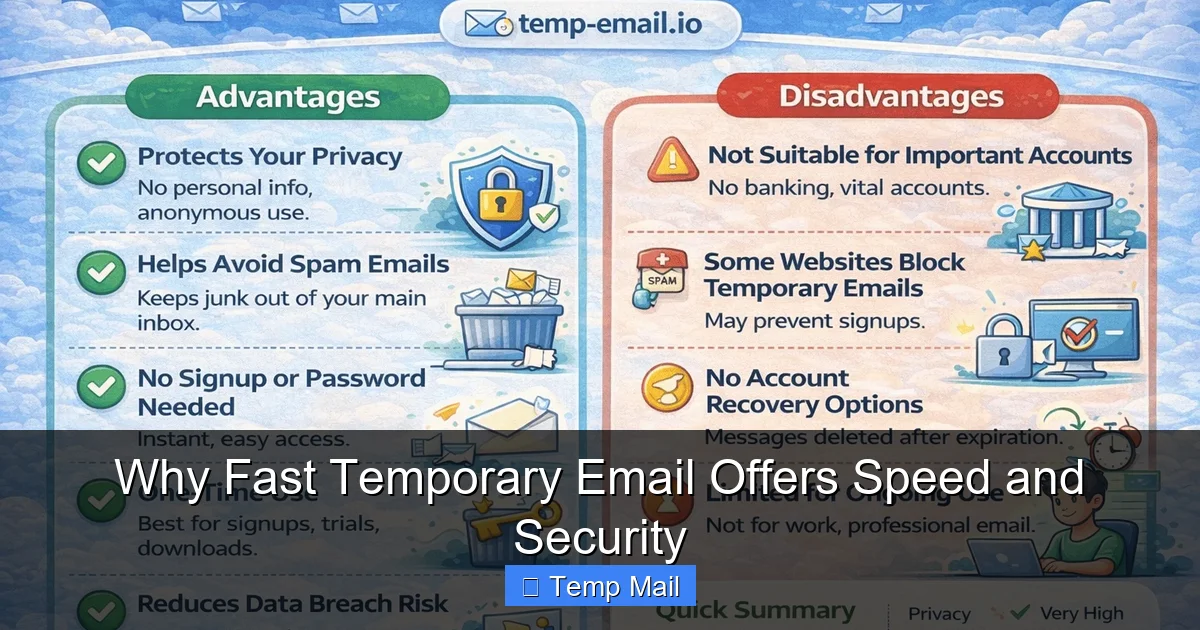
Visual guide about Why Fast Temporary Email Offers Speed and Security
Image source: temp-email.io
Instant Gratification for Content Access
The most common use case is “content gating.” A website wants your email in exchange for a case study, template, or webinar recording. Using your real email means you’ll get added to their marketing nurture sequence for years. Using a temp mail address means you get the file immediately and never hear from them again. The speed here is dual-purpose: the service generates the address fast, and it fast-tracks you out of a marketing funnel. You complete your task in under a minute instead of a multi-day process of unsubscribing later.
Streamlining Development and Testing
For developers, QA testers, and product managers, fast temporary email is a secret weapon. Need to test a new user registration flow across multiple accounts? You can generate 10 different disposable addresses in two minutes. Need to verify that a “forgot password” email sends correctly? Use a temp inbox to receive and inspect that reset link. This rapid-fire ability to create and discard email identities accelerates testing cycles dramatically, removing the bottleneck of setting up real email accounts.
Bypassing “Email Already Registered” Walls
Ever tried to sign up for a service with a promo code only to be told, “This email is already registered”? If you’ve used your primary email for similar offers before, you’re stuck. A fast temporary email service lets you instantly spin up a brand-new, never-before-used address. This bypasses those registration walls on first-come-first-serve deals, beta lists, or regional promotions where you might only qualify once per email.
How Fast Temporary Email Bolsters Your Security & Privacy
Speed is the hook, but security and privacy are the lasting value. Your email address is a primary identifier. When you give it out freely, you create a data point that can be:
Visual guide about Why Fast Temporary Email Offers Speed and Security
Image source: maillog.org
- Sold to data brokers.
- Used in phishing attacks (spear phishing is more convincing with your real email).
- Cross-referenced with other breaches to build a profile of you.
- Used to reset passwords on other sites if you (unwisely) reuse credentials.
A disposable address compartmentalizes this risk.
The Principle of Compartmentalization
Think of your digital identity like a series of rooms in a house. Your primary email is your master bedroom—it holds your most sensitive information. Every time you use it for a low-stakes sign-up (like a random news site), you’re inviting a stranger into that bedroom. A fast temporary email is like a separate, anonymous guest room. You let the stranger in there, they get what they need (your click, your download), and then you seal the room forever. If that guest room is ever burglarized (the website gets hacked), your master bedroom remains untouched. This is the core security philosophy: isolate activities to prevent cascading breaches.
Eradicating Spam at the Source
Spam isn’t just annoying; it’s a security threat. Malicious attachments and phishing links hide among the noise. By never giving your real address to untrusted sites, you prevent spam from ever being generated in your primary inbox. There’s nothing to filter, no risk of accidentally clicking a malicious link in a “promotional” email that looks legit because it’s from a site you vaguely remember. The spam simply goes to the temporary inbox, which dies before you even see it.
Mitigating Data Broker Profiling
Data brokers collect tiny pieces of your information from everywhere to build and sell profiles. Your email is a unique key that ties all those pieces together. Using a different, disposable address for every minor interaction breaks that chain. A data broker might get one email from Site A and another from Site B, but they can’t link them back to *you* or your main accounts. This practice, called “email aliasing on steroids,” makes the profile they build on you incredibly thin and less valuable.
Practical, Real-World Use Cases You Need to Know
The theory is great, but where does this actually shine in everyday life? Here are the most common and impactful scenarios:
Visual guide about Why Fast Temporary Email Offers Speed and Security
Image source: meme-arsenal.com
1. Accessing Gated Content Without Commitment
This is the #1 use. You want a research report, a toolkit, or a software trial. The site asks for an email. Use a fast temporary email. Get the download link instantly. No follow-up sales calls, no “we miss you” emails six months later. You get the resource, and your primary inbox stays clean.
2. Signing Up for One-Time Events or Promotions
Found a great coupon that requires an email sign-up? A contest you want to enter once? A webinar you’ll attend live but don’t want ongoing updates from? A disposable address is perfect. It accepts the confirmation email, you use the code or link, and then the address dies. No long-term relationship is formed.
3. Testing Online Services and Apps
As mentioned, for tech professionals, this is invaluable. But even casual users can benefit. Want to try a new social media app but feel uneasy about its privacy policy? Sign up with a temp email first. Explore the app’s basic features. If you hate it or find it sketchy, you uninstall it, and there’s no trace of your real email in their database. You’ve “test-driven” with zero risk.
4. Protecting Your Identity on Forums and Comment Sections
Many forums and news sites require an account to comment. If you want to post a strong opinion on a controversial topic without risking doxxing or harassment, a temporary email is your shield. It allows you to participate in discourse while keeping your primary identity and inbox safe from targeted backlash.
5. Avoiding “Email Already Used” on Shared Devices
Using a public computer or a shared family device? You might need to quickly sign up for something. Using your personal email on a shared machine is a security risk (cookies, saved logins). A fast temporary email service lets you create a one-time identity, complete your task, and close the browser with no lingering session.
Choosing the Right Fast Temporary Email Provider
Not all services are created equal. While the core function is similar, critical differences in privacy policy, uptime, and features exist. Here’s what to look for:
Essential Criteria: Privacy and Anonymity
First, read the privacy policy. The best providers explicitly state they do not log IP addresses, do not correlate your session with your address, and delete all data permanently upon inbox expiration. Avoid any service that requires you to create an account *to use* their temporary email—that defeats the purpose. The ideal provider is completely anonymous: you visit, you get an address, you leave.
Uptime and Inbox Reliability
Speed is useless if the service is down. Check user reviews or test a few providers. Does the inbox populate reliably within 10-15 seconds of the email being sent? Do emails sometimes fail to arrive? A reliable fast temporary email service has robust mail servers that handle high volume without dropping messages. You need to trust that the verification email will be there waiting.
Inbox Lifespan and Customization
Most offer 10-60 minute lifespans. Some premium options offer 24-hour or longer inboxes. Consider your use case. For a quick download, 10 minutes is fine. For a multi-day forum registration process, you might need a longer window. Some services also let you choose a custom alias (e.g., [email protected]) instead of a random string, which can be easier to type or remember for a slightly longer session.
Browser Extensions and Mobile Experience
The most seamless experience comes from a provider that offers a browser extension. With one click, it generates a new address, copies it to your clipboard, and opens the inbox. This removes all friction. Also, check if their mobile site is fast and functional, as many of us are on phones when we need quick access.
Our Recommendation Criteria
Based on the above, a top-tier fast temporary email service should be: 1) 100% no-registration, 2) have a clear no-logs policy, 3) boast 99%+ uptime, 4) offer at least a 10-minute inbox, and 5) provide a one-click browser extension for ultimate speed.
Best Practices and Crucial Limitations to Remember
Using a temporary email tool is simple, but using it *correctly and safely* requires understanding its boundaries.
Use It For What It’s Designed For: One-Way Communication
Temporary email is for receiving verification links, download links, and newsletters you’ll never read. It is NOT for:
- Important account registrations ( banking, main social media, primary cloud storage). You will be locked out forever when the address expires.
- Any communication where you need a reply. If a company needs to email you a contract, a support ticket update, or a flight itinerary, you must use a permanent address.
- Creating accounts for services you intend to use long-term. It’s a false economy; you’ll just have to create a new account later with your real email, losing any history or data.
Don’t Use It for Illegal Activities
This should be obvious, but it’s worth stating. Using anonymity tools for fraud, harassment, or illegal transactions doesn’t make you invisible to law enforcement. It simply adds a layer of obfuscation that, in serious cases, can be penetrated. These services are for privacy and convenience, not for criminal behavior.
Check the Site’s Legitimacy First
A temporary email protects you from the *site’s* data practices, but it doesn’t make the site itself safe. You still shouldn’t enter your real name, address, or credit card information on a suspicious website just because you’re using a temp email. The temp mail only protects your *email identity*, not your financial or personal data. Always assess the site’s trustworthiness (HTTPS, clear contact info, professional design) before providing any sensitive information, even with a disposable address.
Understand the “Reply” Limitation
Most temporary email services do not allow you to send emails from the disposable address. The inbox is receive-only. This is by design to prevent spam abuse. If a website’s workflow requires you to reply to an email (e.g., “reply to this email to confirm”), a temporary address likely won’t work. You’ll need a permanent solution for that specific interaction.
The Future of Ephemeral Communication and Your Digital Life
The rise of fast temporary email points to a larger shift in digital consciousness. We are moving from a paradigm of “give everything away for free access” to one of “minimal viable data exchange.” It’s a tool of empowerment, putting the control of your primary identity back in your hands. As data privacy regulations like GDPR and CCPA grow, and as consumers become savvier, the use of privacy-preserving tools like disposable email will move from the tech-savvy fringe to mainstream best practice.
Imagine a near future where your browser has a built-in, one-click “generate disposable identity” button for forms. Where password managers integrate aliased email forwarding (like Apple’s Hide My Email) as a default. The speed and security model of temporary email is the blueprint for this future. It teaches us to question every unnecessary data request and to use the right tool for the job. Your primary email is for people and services you trust. For everything else—the fleeting, the promotional, the experimental—there is now a faster, safer alternative. Embracing this separation isn’t paranoia; it’s proactive digital housekeeping.
Conclusion: Speed and Security, Together
Fast temporary email is more than a trick; it’s a fundamental component of a smart, secure, and efficient digital life. It delivers on its promise with literal seconds of setup time, removing the friction that often leads us to compromise our privacy for convenience. The security it provides—through compartmentalization, spam prevention, and identity shielding—is profound in its simplicity. By creating a digital “burner” for the countless minor interactions that populate our online days, we protect our most valuable communication channel from being cluttered, compromised, and sold.
Start using one today. Bookmark a reputable provider. Next time you see an email field on a site you don’t deeply trust, pause. Instead of typing your real address, generate a temporary one. Experience the 10-second process. Then, days later, smile as you realize your primary inbox is still pristine, with no trace of that interaction. That feeling of control and cleanliness is the true value. In a world racing to collect your data, the fastest way to protect your privacy might be to use an email that doesn’t even last until tomorrow.
Frequently Asked Questions
Is using a fast temporary email legal?
Yes, using a disposable email address is perfectly legal. It is a legitimate privacy tool. However, using it to commit fraud, evade bans, or engage in illegal activities is, of course, illegal. The tool itself is neutral; it’s how you use it that matters.
How long does a typical temporary email inbox last?
Most fast temporary email services offer inboxes that last between 10 minutes and 2 hours. Some premium services extend this to 6, 12, or even 24 hours. The standard 10-60 minute window is sufficient for receiving a single verification or download link.
Can I send emails from a temporary address?
Almost never. Temporary email services are designed as receive-only systems to prevent spam abuse. You cannot compose or send emails from the disposable address. If you need to send a reply, you must use a permanent email account.
Is my activity truly anonymous when using these services?
Reputable providers do not log your IP address or link your session to the disposable address, offering strong anonymity. However, no system is 100% foolproof. The website you are sending the address to will, of course, see the address itself. For maximum anonymity, also use a privacy-focused browser and consider a VPN.
What happens if I need to reset a password for an account I made with a temporary email?
You will be unable to reset it. This is why the golden rule is: never use a temporary email for any account you intend to keep long-term (banking, primary social media, main cloud storage). For throwaway accounts on unimportant forums or test services, losing access is an acceptable outcome.
How is this different from email aliasing features from Apple or Firefox?
Services like Apple’s “Hide My Email” create unique, forwardable aliases that deliver to your real inbox. They are permanent aliases you control. A fast temporary email creates a completely separate, non-forwarding inbox that self-destructs. Temporary email is for extreme, one-time isolation, while aliasing is for long-term, manageable privacy on services you use regularly.