Disposable email is a temporary, anonymous inbox designed to shield your primary email from spam, data breaches, and unwanted tracking. It’s the perfect tool for signing up to websites, downloading content, or testing services without compromising your real identity or cluttering your main inbox. By using a throwaway address, you gain a critical layer of control over your digital footprint, making it a simple yet powerful habit for safer, more private internet browsing.
Let’s have a real talk about your email inbox. That sacred space where your bank statements, family photos, and important work messages live. How often does it get bombarded with newsletters you never asked for, promotional spam from a single website visit, or worse—the dreaded data breach notification? What if I told you there’s a simple, free, and incredibly effective trick to stop this at the source? Enter the world of the disposable email. It’s not some shady hacker tool; it’s your new best friend for navigating the modern web with confidence and control. Think of it as a digital burner phone—a temporary, anonymous inbox you can use and forget, protecting your real identity from the relentless noise of the internet.
In this deep dive, we’re uncovering all the disposable email secrets. We’ll move beyond the basic “it stops spam” and explore the nuanced ways it enhances your security, the precise scenarios where it shines (and where it fails), and how to integrate it seamlessly into your daily browsing. Whether you’re a casual user tired of marketing emails or someone deeply concerned about data privacy, understanding this tool is a game-changer. This isn’t about hiding from the internet; it’s about engaging with it on your own terms.
Key Takeaways
- Core Purpose: Disposable email acts as a protective shield, preventing spam and data harvesting from reaching your permanent, personal email address.
- Anonymity vs. Privacy: It offers strong anonymity for low-stakes interactions but should never be used for critical accounts like banking or primary social media.
- Limited Lifespan: These emails are temporary, typically expiring after a short period (hours to days) or a limited number of messages, which is by design for security.
- Not for Everything: Avoid using disposable email for any service requiring account recovery, long-term access, or legal/official communication.
- Tool for Control: It empowers you to control who gets your real contact information, reducing your digital footprint and minimizing targeted advertising.
- Provider Variety: Numerous free and paid services exist, each with different features like custom domains, browser extensions, or API access for developers.
- Smart Habit: Making disposable email your default for non-essential sign-ups is a low-effort, high-reward security hygiene practice.
📑 Table of Contents
- What Exactly Is a Disposable Email? More Than Just a Temp Address
- The Undeniable Benefits: Why You Should Be Using Disposable Email
- When Disposable Email Shines: Perfect Use Cases
- The Critical Limitations: Where Disposable Email Fails
- Best Practices: How to Use Disposable Email Like a Pro
- Choosing a Disposable Email Service: What to Look For
- The Future of Disposable Email and Digital Identity
- Conclusion: Your Simple Path to a Cleaner, Safer Inbox
What Exactly Is a Disposable Email? More Than Just a Temp Address
At its core, a disposable email (also called temporary email, throwaway email, or temp mail) is a service that provides you with a random, functional email address for a very short period. You don’t need to register, provide personal details, or set a password. You simply visit a website like Temp-Mail.org, Guerrilla Mail, or 10MinuteMail, and a unique inbox is generated for you instantly. You can copy that address, use it to sign up for a service or download a file, and then check the inbox right on that same page to receive a verification link or download file.
The Mechanics: How It Works Under the Hood
The technology is surprisingly straightforward. These services run large pools of mail servers with randomly generated domain names (e.g., @trashmail.com, @10minutemail.com). When you request an address, the system assigns you one from the pool and creates a corresponding inbox linked to that specific address. Incoming emails are routed to that inbox and displayed on a public web interface. Since there’s no password or account persistence, once the inbox is deleted (automatically after a time limit or manually by you), that address is retired and may be recycled much later. This ephemeral nature is the key to its security benefit; there’s no long-term database linking your activity to a persistent identity.
A Brief History: From Developer Tool to Consumer Staple
Disposable email services weren’t originally made for you and me. They emerged in the early 2000s primarily for software developers and testers who needed to automate account creation during software testing without polluting company domains or violating terms of service. The concept was pure utility: create, test, discard. As online spam and data harvesting became pervasive consumer problems, these tools entered the mainstream. What was once a niche utility for QA engineers is now a recommended privacy practice by security experts and journalists worldwide, democratized by free, user-friendly web interfaces.
The Undeniable Benefits: Why You Should Be Using Disposable Email
So, what’s the big deal? Why go through the extra step of using a temp address? The benefits stack up quickly, touching on security, sanity, and privacy.
Visual guide about Disposable Email Secrets for Safe and Secure Online Browsing
Image source: info.miraisecurity.com
Benefit 1: The Spam Sieve
This is the most obvious and immediate win. Every time you use your primary email to sign up for a discount offer, a free ebook, or a forum you might visit once, you’re giving that company permission to email you. Often, that permission is then sold or shared, filling your inbox with promotions. A disposable email acts as a perfect sieve. Let the spam flow into the temporary inbox, which you check once for the verification code or download link, and then abandon. Your permanent inbox remains pristine. Over a year, this can prevent thousands of unwanted messages from ever reaching you.
Benefit 2: Containing the Data Breach Fallout
Data breaches are a matter of “when,” not “if.” When a company you signed up with gets hacked, your email address is often the first piece of personal data exposed. Hackers use these lists for phishing campaigns, credential stuffing attacks (trying your email/password combo on other sites), and selling to spammers. If you used a disposable email for that breached service, the exposed address is a dead end. It leads to an inbox that no longer exists or is inaccessible. Your primary email, and the cascade of accounts linked to it, remains safe from that specific breach’s fallout. It compartmentalizes your digital risk.
Benefit 3: Dodging the Tracking Pixel and Profiling
Many marketing emails contain invisible “tracking pixels” that report back when you open the email, your location, device, and more. This builds a detailed profile of your interests and behaviors. By using a disposable email for newsletters or promotional sign-ups, you ensure any tracking only reveals information about a throwaway identity. You sever the direct link between your browsing/purchasing habits and your true self. It’s a small but significant act of resistance against pervasive behavioral advertising.
Benefit 4: Zero Commitment, Zero Liability
You want to try a service’s premium features for a week but dread the inevitable cancellation hassle and marketing emails? Use the disposable email. You can receive the trial confirmation, use the service, and when the trial ends, the company has no way to chase you down or charge a “forgot to cancel” fee because there’s no persistent email to bill. You have zero long-term liability. This is also perfect for one-time downloads, accessing gated content (like a single whitepaper), or joining a webinar where you don’t intend to engage long-term.
When Disposable Email Shines: Perfect Use Cases
Knowing the theory is good, but seeing the practical applications is where it clicks. Here are the prime scenarios where a disposable email isn’t just helpful—it’s the smart play.
Visual guide about Disposable Email Secrets for Safe and Secure Online Browsing
Image source: howtoremove.guide
Scenario 1: The “Freebie” Download
You find a fantastic template, ebook, or software trial that requires an email address. This is the #1 use case. You want the asset, not a relationship with the company’s marketing department. Generate a disposable email, get the download link, and move on. No newsletter subscriptions, no follow-up sales emails. The asset is yours, and your inbox is untouched.
Scenario 2: Testing a New Service or App
Curious about a new social platform, project management tool, or streaming service? Before you commit your primary email (and potentially link it to future payment methods), create an account with a disposable email. Test the interface, the features, the user experience. If you hate it, you simply stop using the temp address. No cleanup required, no feeling of being “locked in” before you’re ready. It’s a risk-free trial for your digital identity.
Scenario 3: Anonymous Forum or Comment Section Participation
Want to join a discussion on a controversial topic, ask a sensitive question in a support group, or comment on a news article without your real name attached? Many forums require email verification. A disposable email lets you verify the account and participate with a layer of anonymity. Remember, true anonymity online is complex, but this removes the easy email-identity link.
Scenario 4: Avoiding “Account Linking” on Public Wi-Fi or Shared Devices
You’re at a library, airport, or coffee shop using a public computer or an untrusted Wi-Fi network. You need to access a website that requires login. Logging into your real email or social media on such a network is a security risk. Instead, if the site allows email-based login, use a disposable email to create a temporary, isolated session. This prevents session hijacking or keyloggers from gaining access to your primary accounts.
Scenario 5: One-Time Coupon or Contest Entry
See a great coupon code that requires email sign-up, or a contest you want to enter? The odds of winning are low, but the certainty of getting added to a promotional list is high. Use the disposable email. Get the coupon code (often delivered instantly), use it, and let the temp inbox handle any future “winner!” or “last chance!” spam.
The Critical Limitations: Where Disposable Email Fails
Despite its power, a disposable email is a specialized tool, not a universal replacement for your primary email. Using it in the wrong context can cause real problems. Here are the hard boundaries.
Visual guide about Disposable Email Secrets for Safe and Secure Online Browsing
Image source: hackcontrol.org
Limitation 1: No Account Recovery, Ever
This is the most important rule. If you use a disposable email to sign up for a service where you might need to recover your password, you will be permanently locked out. The “forgot password” link will send a reset email to an inbox that is gone. This includes: primary social media accounts (Facebook, Twitter, Instagram), banking and financial apps, cloud storage (Google Drive, Dropbox), password managers, and any service you value. For these, your primary, secure, and permanent email is non-negotiable.
Limitation 2: It’s Obvious (And Sometimes Blocked)
Many websites and platforms actively block known disposable email domains. They see “@tempmail.com” and reject the sign-up during validation. This is because they want genuine user engagement and to prevent abuse. If your temp address is blocked, you’ll need to use your real one or find a less common temp mail provider (though popular ones are usually blacklisted). Don’t be surprised or frustrated by this; it’s a sign the service takes its user base seriously.
Limitation 3: No Long-Term Storage or Search
These inboxes are fleeting. You cannot archive important emails, search through old messages months later, or set up filters. If you need to reference a receipt or a confirmation from six months ago, a disposable email won’t have it. It’s a read-and-forget channel. Any critical documentation must go to your permanent account.
Limitation 4: Potential for Abuse and Reputation Damage
Because they are anonymous, disposable email services are sometimes used for malicious purposes: creating spam accounts, posting abuse, or bypassing bans. While the service itself isn’t illegal, using it for fraud or harassment is. Furthermore, if a temp mail domain gets a bad reputation, emails from it might be flagged as spam by major providers (like Gmail or Outlook), meaning even legitimate emails you send *from* that temp address might not get delivered. You have no control over the domain’s reputation.
Best Practices: How to Use Disposable Email Like a Pro
To get the maximum benefit and avoid pitfalls, follow these smart habits. It’s about strategic use, not just blind adoption.
Rule 1: The Golden Hierarchy of Email Addresses
Adopt a tiered system. Tier 1: Your primary, permanent, highly secure email (used for banking, main social media, password recovery, official docs). Tier 2: A secondary, semi-permanent email (perhaps from a secure provider like ProtonMail) used for professional networking, important newsletters you actually want, and services you use regularly but aren’t life-critical. Tier 3: The disposable email for everything else—one-off downloads, forum sign-ups, trial accounts. This hierarchy contains risk and clutter at the appropriate level.
Rule 2: Never Use It for Financial or Official Matters
This cannot be stressed enough. No online shopping (where order confirmations and shipping tracking are vital), no government services, no university portals, no job applications. The moment you need proof of transaction, legal standing, or long-term access, a temporary address is a liability. Stick to your Tier 1 and 2 emails here.
Rule 3: Check the Inbox Promptly
Many disposable email inboxes have a very short active window—sometimes as little as 10 minutes to 1 hour after the last email arrives. If you’re signing up for something and need a verification link, be ready to check the inbox immediately. Don’t close the tab and plan to check it later; you might find the inbox has already expired and the link is dead.
Rule 4: Use Browser Extensions for Seamless Integration
Manually copying and pasting a temp address can be tedious. Services like SimpleLogin (now part of Proton) or Firefox Relay offer browser extensions that generate a unique, forwardable alias on the fly. You can set your alias to forward to your real inbox, giving you the benefit of a disposable address for sign-up while still receiving emails in your main client. These are more advanced, often have free tiers, and provide a smoother experience than a basic web-based temp mail site.
Rule 5: Know When to Delete Manually
Even if an inbox has a 24-hour auto-delete, if you’ve used it for a specific purpose and received the needed email, manually close/delete that inbox session. This ensures the address is retired immediately and can’t be accidentally reused by someone else (a minor risk, but good practice). It also cleans up your mental workspace.
Choosing a Disposable Email Service: What to Look For
Not all disposable email providers are created equal. While most free web services do the basic job, differences in usability, privacy policy, and features exist.
Key Evaluation Criteria
- Inbox Lifespan: How long does the inbox stay active after creation or after the last email? 10 minutes? 1 hour? 1 day? Choose based on your need. For instant verification, 10-60 minutes is fine. For a trial that might send a welcome email later, look for 24-hour options.
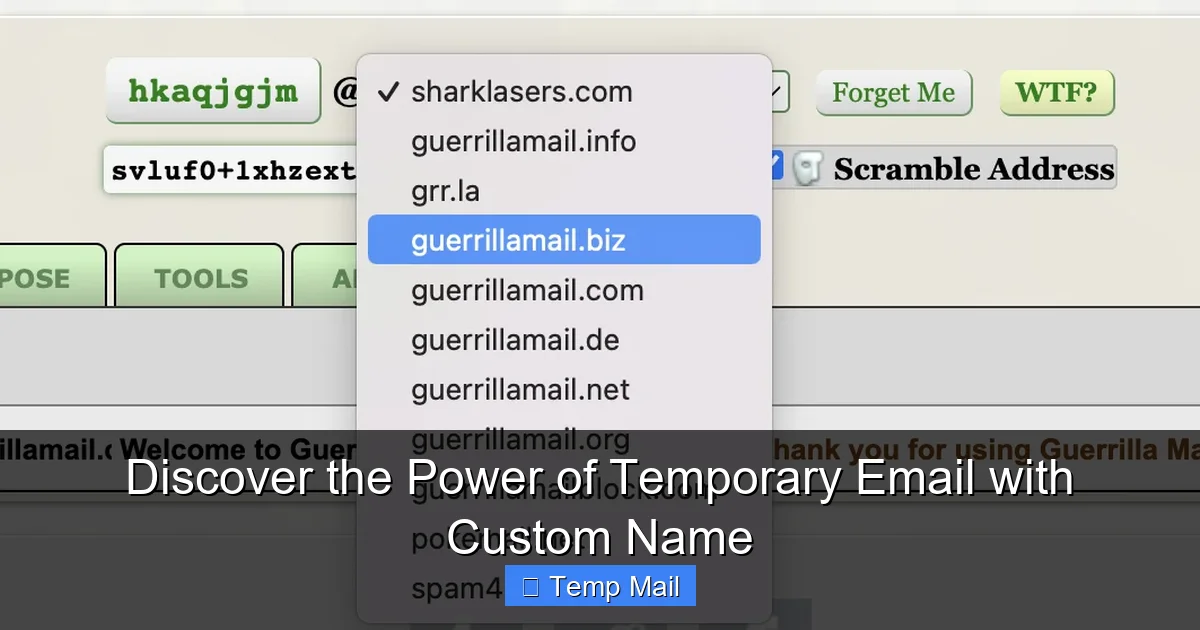
- Domain Variety: Does it offer multiple domain options (e.g., @mailinator.com, @guerrillamail.com)? This can help if one domain is blocked on a particular site.
- Privacy Policy: Does the service log IP addresses? Do they claim to not store emails after deletion? Read the fine print. The best ones have clear policies stating they do not log or sell user data.
- User Interface & Features: Is the inbox clean? Can you reply to emails? Some advanced services allow replies, which can be useful for two-way communication without using your real address.
- Ad Intrusiveness: Many free services are ad-supported. Expect pop-ups and banners. If this is annoying, consider a paid service or an alias-forwarding service like SimpleLogin.
Recommended Starting Points
For beginners, Temp-Mail.org is extremely user-friendly with a clear interface and decent inbox lifespan. Guerrilla Mail is a veteran, offering more domain choices and a slightly longer lifespan. 10MinuteMail is exactly what it says—a strict 10-minute inbox for the fastest, most disposable needs. If you want a more integrated solution, explore Firefox Relay (if you use Firefox) or SimpleLogin, which create unique email aliases that forward to your real address, offering more control and a cleaner experience.
The Future of Disposable Email and Digital Identity
The rise of disposable email is a symptom of a larger shift. As data privacy becomes a mainstream concern, tools that give individuals granular control over their personal information are gaining traction. We’re moving from a model of “give everything away for free services” to one of “minimal necessary data exchange.” Disposable email is a perfect embodiment of this: you give just enough (a temporary address) to get the service, and nothing more.
Looking ahead, we may see tighter integration with password managers and privacy-focused browsers. Imagine your browser automatically suggesting a new disposable email alias every time you hit a sign-up form. Regulations like GDPR and CCPA also empower users to request data deletion; using a temp address makes that request trivial because there’s no persistent data to delete from the service provider’s side regarding your identity. The tool is simple, but its philosophical impact—reclaiming ownership of your contact information—is profound.
Conclusion: Your Simple Path to a Cleaner, Safer Inbox
Mastering the use of disposable email is one of the easiest and most impactful privacy upgrades you can make. It requires no technical skill, costs nothing, and takes seconds. It’s not a silver bullet for all online threats, but it’s an incredibly effective first line of defense against the daily barrage of spam, profiling, and data aggregation that clogs our digital lives. By consciously compartmentalizing your online interactions—using a permanent address for what truly matters and a throwaway one for everything else—you dramatically reduce your attack surface and your digital clutter.
Start today. The next time a website asks for your email for a “free resource” or a “quick trial,” pause. Open a new tab, generate a disposable email, and use that instead. Experience the quiet satisfaction of watching the spam flow into a void instead of your primary inbox. This small habit is a powerful act of digital self-care, putting you back in control of who has access to your most common point of contact online. Your future, less-spammed self will thank you.
Frequently Asked Questions
Is using disposable email legal?
Yes, using disposable email services is completely legal. They are legitimate tools provided by companies for privacy and testing purposes. However, using them for fraudulent activities, illegal purchases, or to evade bans on platforms where you are a member is illegal and violates most services’ terms of use.
Can disposable emails be traced back to me?
Generally, no. Since you don’t create an account or provide personal information, the service itself has no data linking the address to you. However, your IP address may be logged by the temp mail provider when you access the inbox. For truly sensitive anonymity, using a reputable VPN alongside a disposable email adds an extra layer. Any activity you perform *using* that email (like posting on a forum) can, of course, be traced back to the disposable address itself, but not to your real identity unless you reveal it.
What happens to the emails sent to a disposable address after it expires?
They are permanently deleted from the service provider’s servers. Once the inbox’s time limit is up or it is manually closed, all emails within it are purged. The email address is then typically recycled and assigned to a new user at some point in the future, meaning any future emails sent to that old address will go to a completely different person.
Are disposable emails safe for online shopping?
Absolutely not. You should never use a disposable email for any purchase, especially online shopping. Order confirmations, shipping notifications, receipts, and customer service communications will be sent to an inbox that will disappear, leaving you with no proof of purchase or way to track your order. Use your permanent, monitored email for all transactions.
Why do some websites block disposable email domains?
Websites block these domains to prevent spam, abuse, and fake account creation. Disposable emails make it easy for bad actors to create numerous accounts for posting spam, scraping content, or bypassing bans. By blocking known temp mail domains, a service aims to ensure its users are real, engaged, and accountable, which improves community quality and reduces server load from fake accounts.
What’s the difference between a disposable email and a secure/encrypted email service like ProtonMail?
They serve opposite purposes. A disposable email is anonymous, temporary, and unsecured (emails are often not encrypted in transit/at rest by the provider). Its goal is to be a short-lived shield. A secure email service like ProtonMail is permanent, requires account creation (with optional minimal info), uses end-to-end encryption, and is designed for long-term, private communication where security and data ownership are paramount. One is for throwaway sign-ups; the other is for your private, important correspondence.