Temporary email services provide disposable inboxes to protect your primary email from spam, data breaches, and unwanted tracking. They are essential for signing up to untrusted websites, verifying accounts without commitment, and safeguarding your online privacy. Choosing the right temporary email service provider means evaluating factors like inbox longevity, domain variety, security protocols, and ease of use to match your specific needs.
Ever felt that pang of hesitation when a website asks for your email? You know the drill. You’re excited to download that e-book, access that gated article, or create an account for a one-time service. But handing over your primary email address feels like giving out your home address to every stranger on the internet. It’s a one-way ticket to Spam City, with a high probability of your data ending up on a marketing list you never signed up for. This is where the humble, powerful, and incredibly useful temporary email service provider comes into play. It’s not just a tool for the privacy-paranoid; it’s a fundamental instrument for smart, secure, and stress-free browsing in the modern digital landscape. Let’s embark on a complete journey to discover how these services work, why you need one, and how to pick the best one for your daily digital life.
Key Takeaways
- Privacy Shield: A temporary email service acts as a protective barrier, preventing your personal or primary work email from being sold to marketers or exposed in data breaches.
- Spam Combat Tool: By using a disposable address for one-time sign-ups or downloads, you drastically reduce the amount of promotional and phishing emails cluttering your main inbox.
- No Registration Needed: Most leading providers generate an inbox instantly without requiring any personal information, sign-up, or password, emphasizing anonymity.
- Feature Diversity: The best providers offer more than just an inbox; look for browser extensions, API access, custom domains, and extended inbox timers.
- Security is Paramount: Choose services that use HTTPS encryption, have clear privacy policies stating no email logging, and automatically delete messages after a set period.
- Use Case Specific: Not all temp mail is equal. Some excel at quick verification codes, others at handling file attachments or providing long-lasting addresses for forum registrations.
- Not for Critical Accounts: Never use a temporary email for banking, primary social media, or any account where password recovery is vital, as you will lose access permanently.
📑 Table of Contents
- What Exactly is a Temporary Email Service?
- Why You Absolutely Need a Temporary Email Service
- How to Choose the Best Temporary Email Service Provider
- Top Features to Look For in 2024 and Beyond
- Security and Privacy: The Non-Negotiable Foundation
- Practical Guide: How to Use Temporary Email Effectively
- The Future of Disposable Communication
- Conclusion: Embrace Smart, Temporary Digital Identities
What Exactly is a Temporary Email Service?
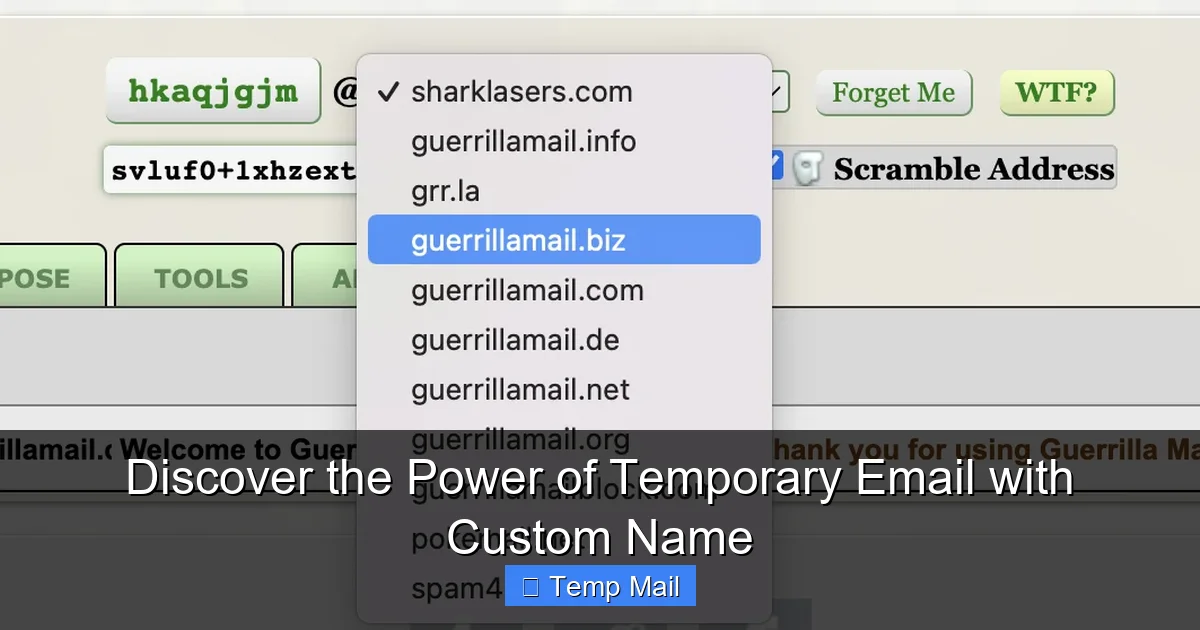
At its core, a temporary email service provides you with a disposable, anonymous email address and a corresponding inbox for a short, predefined period. Think of it as a digital burner phone or a PO box that self-destructs. You visit the provider’s website, and instantly, an email address like [email protected] is generated for you, along with an inbox that’s already active and waiting. You can use this address to receive emails—usually verification codes, download links, or welcome messages—without ever linking it to your real identity.
The Core Mechanics: How It Works Instantly
The magic lies in simplicity. There’s no account creation. No password to remember. The provider’s system automatically generates a random mailbox on their server and assigns it a random or selectable username under their domain. The inbox is publicly accessible via a unique URL or a session-based token. When an email arrives for that address, it’s parsed and displayed in that web-based inbox. After a set time—often 10 minutes to 1 hour for the most ephemeral services, or up to several days for others—the entire mailbox, along with its contents and the address itself, is permanently purged from the system. This automatic deletion is a key feature, ensuring no residual data is left behind.
Historical Context: From Anonymity to Mainstream Utility
While the concept of disposable email has been around since the early 2000s (with pioneers like Mailinator), its necessity has exploded. Initially popular in forums and tech-savvy circles for avoiding spam, it’s now a mainstream utility. The rise of data harvesting, aggressive email marketing, and ubiquitous “sign-up walls” has pushed everyday users to seek simple privacy tools. What was once a niche tool is now a recommended best practice for digital hygiene, akin to using a password manager.
Why You Absolutely Need a Temporary Email Service
You might be thinking, “I just use a separate email for sign-ups.” That’s a good start, but a dedicated temp mail service is a different, more powerful animal. It’s the difference between a locked drawer and a shredder. Here’s why making it part of your routine is a non-negotiable for digital safety.
Visual guide about Discover the Best Temporary Email Service Provider Today
Image source: cdn.mos.cms.futurecdn.net
1. The Ultimate Spam and Phishing Defense
Every time you use your “spam” email for a website, you’re still trusting that website. They could have poor security, sell your data, or suffer a breach. That email address, even if secondary, is still yours and can be used to target you. A temporary address is a dead end. Once the inbox expires, the address is gone. Any future spam sent to it bounces into the void. This breaks the chain of tracking and eliminates the risk of phishing emails arriving in an inbox you actually check.
2. Bypassing “Email-Only” Gated Content
How many times have you abandoned reading an article because it demanded an email? With a temp mail service, you can breeze through these gates in seconds. Generate an address, paste it, check the inbox for the link or code, and consume the content. No commitment, no future newsletters, no guilt. It democratizes access to information that’s unfairly locked behind an email wall.
3. Safe Software and File Trials
Many legitimate software trials require an email for license key delivery. Using your primary email for this means you’ll likely get added to their marketing list for years. A temp mail address lets you get the key, use the trial, and then walk away cleanly. The same applies to downloading files from less-reputable sources. If the download link is emailed, you can use a disposable address to receive it without exposing your main account.
4. Testing and Development
For developers, QA testers, and marketers, temp mail is indispensable. Need to test an email verification flow? Create 100 test accounts without managing 100 real inboxes. Need to see how a welcome email renders? Send it to a disposable address. It streamlines workflows and keeps professional and testing communications completely separate.
5. Anonymity for Sensitive Registrations
Whistleblower platforms, certain activist forums, or support groups for sensitive issues often advise using a temporary email for the first point of contact. It allows individuals to reach out or register without fear of their primary digital identity being linked to the activity, providing a crucial layer of operational security.
How to Choose the Best Temporary Email Service Provider
Not all temp mail services are created equal. While the core function is similar, the devil is in the details. Choosing the wrong provider could mean your emails are logged, your inbox expires too quickly, or the service is unreliable. Here’s your checklist for vetting.
Visual guide about Discover the Best Temporary Email Service Provider Today
Image source: cdn.mos.cms.futurecdn.net
Essential Criteria: The Non-Negotiables
- No Registration & No Logs: The gold standard. The provider should not ask for any personal info and must have a clear policy of not storing or logging the emails that pass through their system. If they ask you to sign up, run.
- HTTPS Encryption: The website must use HTTPS. This encrypts the connection between your browser and their server, preventing eavesdroppers on public Wi-Fi from seeing the emails you’re viewing.
- Inbox Lifespan: How long does the inbox stay active after the first email arrives? 10 minutes is fine for a quick verification code. But if you’re signing up for a service that emails a weekly newsletter, you might need an inbox that lasts 24-48 hours. Look for providers that offer options.
- Domain Variety: Some providers offer multiple domain names (e.g., @tempmail.com, @discard.email, @10minutemail.com). This is useful if a specific website blocks known temp mail domains. Having options lets you switch if one domain is blacklisted.
Advanced Features for Power Users
Once you’ve cleared the basics, these features separate the good from the great:
- Browser Extensions: Services like Temp-Mail.org offer Chrome/Firefox extensions. These are game-changers, allowing you to generate a new address with one click from any webpage without even visiting the provider’s site.
- API Access: For developers and businesses, an API allows you to programmatically generate and manage disposable addresses within your own applications or workflows.
- Custom Domain (Paid): Some premium services let you use your own domain for disposable addresses (e.g., [email protected]). This looks more professional for business-specific uses while maintaining the disposable backend.
- File Attachment Support: Can the inbox receive and display attachments (PDFs, images)? Not all can handle this reliably.
- Reply Functionality: A rare but useful feature. Some advanced services allow you to reply to an email from the disposable address, forwarding it through their servers. This is handy for brief, anonymous communication threads.
Red Flags to Avoid
Steer clear of services that:
- Require an account or email to “activate” a disposable address.
- Display excessive, intrusive ads that mimic inbox content (clickbait).
- Have a privacy policy that is vague or states they may store data.
- Are consistently down or slow, as you might miss a time-sensitive verification code.
- Are owned by companies with a history of poor data handling.
Top Features to Look For in 2024 and Beyond
The temp mail landscape is evolving. Modern providers are adding features that address contemporary needs. Here’s what a cutting-edge temporary email service provider should offer today.

Visual guide about Discover the Best Temporary Email Service Provider Today
Image source: cdn.mos.cms.futurecdn.net
Mobile-Friendly Web Interfaces & Apps
We manage our lives on smartphones. A responsive, fast-loading web interface is mandatory. Some leading providers now offer dedicated iOS and Android apps, allowing you to generate addresses and check inboxes on the go with native notifications—a huge convenience for receiving verification codes while you’re away from your computer.
Advanced Inbox Management
Beyond just viewing emails, look for:
- Auto-Refresh: The inbox should automatically poll for new messages without you needing to manually reload the page.
- Message Preview: See the first few lines of an email before opening it.
- One-Click Deletion: Clear the entire inbox with a single button press for instant cleanup.
- Time Extension: Some services allow you to manually extend the lifespan of an active inbox if you anticipate needing it a bit longer.
Integration with Password Managers
Forward-thinking users store their generated disposable addresses in their password manager (like Bitwarden or 1Password) alongside the site they registered for. A good temp mail service facilitates this by providing a clear, copyable address and a direct inbox link that can be saved as a secure note.
Ad Experience: Less is More
Free services need revenue. Acceptable ads are static and clearly separated from your inbox. Unacceptable practices include pop-ups, animated ads that look like notification buttons, or “download” buttons that are actually ad links. The best providers strike a balance, often offering a low-cost premium tier to remove ads entirely.
Security and Privacy: The Non-Negotiable Foundation
Using a tool meant for privacy that itself compromises your security is the ultimate irony. A trustworthy temporary email service provider must be built on a foundation of robust security and transparent privacy practices.
Encryption: HTTPS is the Bare Minimum
As mentioned, all communication with the provider’s website must be encrypted via TLS/SSL (the “S” in HTTPS). This protects your session from being hijacked on a local network. Check for the padlock icon in your browser’s address bar when using the service.
Data Handling Policy: The “No Logs” Promise
The provider’s privacy policy must explicitly state that they do not log, store, or analyze the content of emails passing through their system. Emails should be stored only temporarily on the server for delivery to the inbox and then automatically purged. The policy should also clarify what, if any, metadata (like IP addresses for abuse prevention) is logged and for how long. A provider that is vague here is a major risk.
Server Jurisdiction and Data Laws
The physical location of the provider’s servers matters. Services based in countries with strong privacy laws (like those in the EU under GDPR, or Switzerland) are generally more trustworthy than those in jurisdictions with invasive surveillance laws (like the Five Eyes alliance). However, the “no logs” policy is more critical than location alone.
Open Source and Transparency
Some of the most respected disposable email services have open-source components or publish transparency reports. This allows the security community to audit their code for backdoors or vulnerabilities, building immense trust. While not common, this is the gold standard for transparency.
Abuse Handling and Blacklisting
Temp mail services are constantly battling being blacklisted by major platforms (like Google, Facebook) because spammers abuse them. A good provider actively manages their IP reputations and domains to minimize blacklisting. They also have clear abuse reporting mechanisms to comply with legal requests for illegal content (like child exploitation), which is a necessary evil. Understand their abuse policy—it should be reasonable and targeted.
Practical Guide: How to Use Temporary Email Effectively
Knowing *why* to use temp mail is half the battle. Using it *correctly* ensures you get the benefits without the pitfalls. Here’s your step-by-step playbook.
Step 1: Choosing the Right Moment
Use temp mail for:
- Downloading whitepapers, e-books, or templates.
- Signing up for a forum or comment section you’ll rarely use.
- Creating a trial account for a SaaS tool you’re testing.
- Accessing a coupon or discount that requires an email.
- Verifying a phone number via an email-to-SMS gateway (some services offer this).
Never use it for:
- Your primary email account (Gmail, Outlook, etc.).
- Banking, financial services, or cryptocurrency exchanges.
- Important cloud storage (Dropbox, Google Drive).
- Any account where password recovery via email is the primary method.
- Professional or client communications.
Step 2: The 60-Second Sign-Up Flow
1. Navigate to your chosen provider (e.g., TempMail.org, 10MinuteMail.com).
2. The inbox and address are generated instantly. Copy the email address.
3. Paste it into the website’s sign-up form.
4. Switch back to the temp mail tab. The inbox should auto-refresh. You’ll see the verification email arrive.
5. Open it, copy the code or click the link.
6. Complete the sign-up on the original site.
7. Close the temp mail tab. The address and inbox will expire on their own.
Step 3: Managing Multiple Addresses
If you’re a heavy user, you might need more than one address at a time. Some providers allow you to “refresh” and get a new address while keeping the old one active for its remaining time. Bookmark the inbox URLs if you need to check back on an address later within its lifespan. Your password manager is the perfect place to store these temporary notes.
Step 4: Dealing with Blacklists
Sometimes, a website simply won’t accept a disposable address from a known domain. If this happens:
- Use your provider’s “change domain” or “new address” feature to get a different @domain.
- Switch to a different temp mail provider entirely.
- As a last resort, use your secondary “real” email address for that specific site.
The Future of Disposable Communication
The role of temporary email is expanding. We’re seeing:
- Integration with Privacy Suites: Services like Firefox Relay and Apple’s “Hide My Email” (part of iCloud+) are blurring the line between temporary and alias email. They provide forwardable, managed aliases that feel more permanent but can be disabled instantly. This is the future: seamless, built-in disposable addressing.
- AI-Powered Inbox Filtering: Next-gen temp mail might use AI to categorize incoming emails (e.g., “Verification Code,” “Newsletter,” “Download Link”) directly in the simple interface.
- Enhanced Anonymity Networks: Integration with Tor or decentralized networks could make the origins of temp mail requests even harder to trace.
- Regulatory Push: As data privacy laws like GDPR and CCPA strengthen, the legal right to use pseudonymous or disposable data for non-essential services may become more recognized, potentially increasing adoption.
Conclusion: Embrace Smart, Temporary Digital Identities
Your email address is a master key to your digital identity. It’s linked to your name, your accounts, and your online behavior. Treating it as a precious, private asset is the first step toward reclaiming your digital privacy. A reliable temporary email service provider is not a tool for shady activities; it’s a shield for the everyday user. It’s the simple act of saying “no” to unwanted data collection at the point of entry. By incorporating disposable email into your routine for all non-critical interactions, you clean your primary inbox, reduce your attack surface for phishing, and assert a small but significant degree of control over your personal information. In an era of constant data harvesting, that’s not just smart—it’s essential. Take five minutes today, find a provider that meets the security and feature criteria outlined here, and make your first disposable address. Your future, less-spammed self will thank you.
Frequently Asked Questions
Is using a temporary email service legal?
Yes, using a temporary email service is completely legal in most countries. It’s a legitimate privacy tool. However, using it for fraudulent activities, to bypass legal agreements, or to commit crimes is illegal, as the anonymity does not protect you from law enforcement investigation for serious offenses.
Can I send emails from a temporary address?
Most traditional temporary email services are designed for receiving emails only. They do not have SMTP servers configured for sending. Some advanced or premium services offer limited reply or forwarding functionality, but sending new emails from a disposable address is not a standard feature.
Will websites block my temporary email address?
Many popular websites and platforms actively blacklist domains from known temporary email providers. If your address is blocked, you can usually generate a new address using a different domain from the same provider or switch to a different provider whose domains aren’t on that site’s blacklist.
Are temporary emails truly anonymous?
They offer a high degree of anonymity for the recipient. The address isn’t tied to your identity. However, your activity is not completely invisible. Your IP address is logged by the temp mail provider when you access the inbox, and the website you sign up with logs the IP address used during registration. For extreme anonymity, you would need to use the service over a trusted VPN or Tor network.
What happens to my emails after the inbox expires?
They are permanently and irrecoverably deleted from the provider’s servers. This includes the email content, metadata, and the email address itself. Once expired, that specific address is typically recycled and may be assigned to a different user in the future.
Should I use a temporary email for social media or gaming accounts?
No. You should never use a temporary email for any account where you might need to recover your password or where long-term access is critical. Social media, gaming platforms (Steam, Xbox), and any service with purchased content or stored progress require a permanent, accessible email for account recovery and security. Use a dedicated, secondary permanent email for these instead.