Priyo Fake Mail is a powerful temporary email service designed to shield your real identity online. It lets you create instant, disposable inboxes for signing up on websites, downloading files, or bypassing registration walls without ever revealing your personal email. This simple tool is your first line of defense against spam, data harvesting, and privacy breaches, offering a clean, no-attachment inbox that auto-deletes after use. It’s perfect for anyone wanting to explore the web freely, without leaving a permanent digital footprint.
Have you ever hesitated to sign up for a website, download a free ebook, or comment on a forum because it demanded your email address? You’re not alone. That little voice in your head is your digital survival instinct kicking in. Once your email is out there, it’s often out there forever, feeding spam bots, data miners, and marketing lists. But what if you could have a secret, throwaway email address at your fingertips—one that requires zero setup and vanishes without a trace? Enter the world of temporary email services, and specifically, a tool that’s been gaining traction for its simplicity: Priyo Fake Mail. This isn’t just another tech gimmick; it’s a practical, everyday shield for your online privacy.
Think of your primary email address as your home address. You wouldn’t hand it out to every random store clerk or street surveyor, right? Yet online, we do this constantly. Every new app, every “free” service, every newsletter pop-up asks for it. Priyo Fake Mail gives you a P.O. box for the internet—a temporary drop point you can use and abandon without consequence. In this deep dive, we’ll explore exactly how this tool works, why it’s a non-negotiable part of a smart digital hygiene routine, and how you can leverage it to take back control of your online footprint. Let’s unlock complete online anonymity, together.
Key Takeaways
- Total Privacy Shield: Priyo Fake Mail provides a completely anonymous email address, decoupling your online activities from your real identity and personal contacts.
- Spam & Marketing Immunity: By using a disposable address for sign-ups, you permanently block unsolicited newsletters, promotional emails, and potential malware from reaching your primary inbox.
- Zero Commitment, Zero Risk: There’s no registration, no password, and no personal details required. Inboxes are temporary and automatically vanish, leaving no trace behind.
- Universal Access Tool: It bypasses website registration walls that demand an email, granting you access to gated content, software trials, and forums instantly.
- Simplicity & Speed: Generating a new email address takes seconds. The interface is straightforward—copy the address, use it, and check the inbox on the same page.
- Not for Critical Communications: Remember, these emails are temporary. Never use them for banking, official accounts, or any service where password recovery or long-term access is vital.
📑 Table of Contents
- What Exactly is Priyo Fake Mail? Decoding Disposable Email
- How Does Priyo Fake Mail Work? The Simple, Step-by-Step Magic
- Top 5 Practical Use Cases: When and Why You Need a Fake Mail
- Priyo Fake Mail vs. The Competition: What Makes It Stand Out?
- Security & Anonymity: How “Fake” is “Fake” Really?
- Best Practices: Using Priyo Fake Mail Like a Pro
- Conclusion: Embracing Your Right to Digital Privacy
What Exactly is Priyo Fake Mail? Decoding Disposable Email
At its core, Priyo Fake Mail is a web-based service that generates random, working email addresses on demand. These aren’t fake in the sense that they don’t function; they are real, functional email addresses that can receive messages. The “fake” part refers to their temporary, anonymous, and disconnected nature from your real identity. Unlike Gmail, Outlook, or Yahoo, where you create an account tied to your name and password, a Priyo Fake Mail address is spawned instantly, has no owner, and exists only for a short, predetermined period (usually 10 minutes to a few hours).
The Anatomy of a Disposable Inbox
When you visit the Priyo Fake Mail website, you are automatically assigned a unique email address like [email protected]. That’s it. No forms, no CAPTCHA, no “verify your email” step. Behind the scenes, the service’s server creates a temporary inbox associated with that random string of characters. Any email sent to that address lands in a public queue that only you can see by keeping that browser tab open. Once the time limit expires, or you close the tab, the inbox and all its contents are permanently deleted from the server. There is no archive, no recovery, and no link to you.
How It Differs from Your Regular Email
This is the crucial distinction. Your permanent email is a key to your digital identity. It’s used for password resets, two-factor authentication, official communication, and connecting your social media. Losing access to it can lock you out of your own life. A Priyo Fake Mail address is a sacrificial token. Its only job is to facilitate a single, low-stakes interaction and then be discarded. You wouldn’t use a hotel key card to open your front door, and you shouldn’t use a disposable email for critical accounts. Understanding this difference is the first step to using the tool wisely and safely.
How Does Priyo Fake Mail Work? The Simple, Step-by-Step Magic
The brilliance of Priyo Fake Mail lies in its utter simplicity. The entire process is designed to take less time than brewing a cup of coffee. Here’s the exact workflow, broken down into effortless steps.
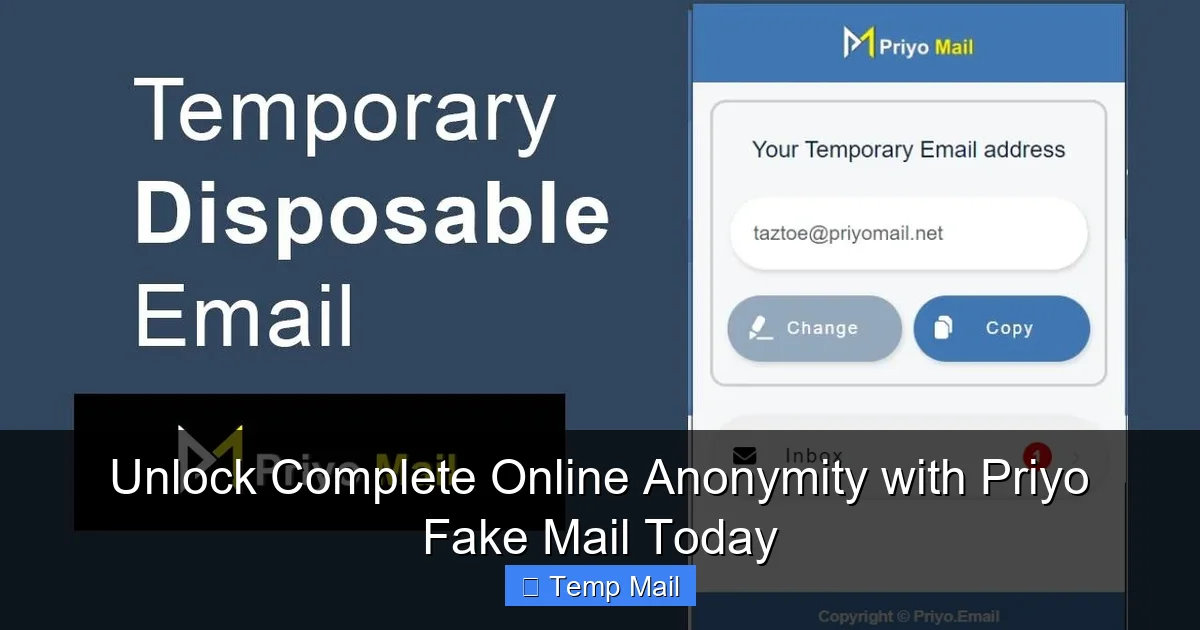
Visual guide about Unlock Complete Online Anonymity with Priyo Fake Mail Today
Image source: addons.mozilla.org
Step 1: Arrive and Grab Your Address
Navigate to the Priyo Fake Mail website. Immediately, you’ll see your brand-new, randomly generated email address prominently displayed. There’s a big “Copy” button next to it. One click, and it’s on your clipboard. That’s your new identity for the next hour.
Step 2: Use It Wherever You Need
Paste that email address into any website’s sign-up or download form. Need to access a gated whitepaper? Use it. Want to comment on a news site without subscribing to their newsletter? Use it. Creating a throwaway account on a forum you’ll barely visit? You guessed it. The website will send a confirmation link or access code to that disposable address.
Step 3: Check Your Inbox Right There
Don’t leave the Priyo Fake Mail tab! Keep it open in a separate window or tab. Within seconds or minutes, the incoming email will appear in the inbox displayed on the same page. You can click on it to read the contents, and often, you can click any links within the email directly from the preview. No forwarding, no logging in.
Step 4: Walk Away and Forget
Once you’ve clicked the confirmation link or copied the needed code, you’re done. You can simply close the browser tab. The email address, the inbox, and all messages are automatically purged by the system after the allotted time (often 10-60 minutes, sometimes up to a day). It’s gone. Poof. No trace left on your device or on their servers linked to you.
Top 5 Practical Use Cases: When and Why You Need a Fake Mail
Knowing that you can use a disposable email is one thing. Knowing when to use it is the secret to maximizing your privacy. Here are the most common, high-impact scenarios where Priyo Fake Mail is the perfect tool.
Visual guide about Unlock Complete Online Anonymity with Priyo Fake Mail Today
Image source: surfshark.com
1. Dodging the Newsletter Spam Tsunami
This is the #1 use case. You find an interesting article on a business site, but to read it, you must “subscribe to our newsletter.” You know that one click will flood your primary inbox with promotional emails for months. Instead, use your Priyo Fake Mail address. Get the article, and when the newsletter “confirmation” email arrives in the disposable inbox, just ignore it. The newsletter never touches your real email. Your inbox stays blissfully clean.
2. Safely Testing “Sketchy” or New Services
Want to try out a new app, game, or online tool that feels a bit untrustworthy? Or maybe it’s a brand-new startup with no reputation. Using your primary email risks your password (if you reuse it) and exposes you to potential data breaches. A disposable email creates a perfect, risk-free sandbox. If the service turns out spammy or gets hacked, you’ve lost nothing of value.
3. Bypassing Mandatory Registration Walls
So many useful resources hide behind “create an account” walls. A research paper, a software trial, a forum thread. Often, you just need to see one piece of content. Creating a real account for this is a chore and a privacy hit. Priyo Fake Mail lets you glide past these walls. Generate an address, get the confirmation email in the same tab, access the content, and walk away. No account created, no password to forget.
4. Protecting Your Identity on Public or Shared Computers
Using a library or hotel computer? Logging into your personal email on a public machine is a security nightmare. Keyloggers or shoulder surfers could steal your credentials. If you need an email for a quick task on such a machine, use Priyo Fake Mail. Since there’s no login and no saved data, you leave absolutely nothing behind for the next user.
5. Managing Multiple Project Identities
Freelancers, marketers, or researchers often need separate email addresses for different projects or clients to keep things organized. Creating dozens of real email accounts is tedious. A disposable email service lets you spin up a unique address for each short-term project, keeping your main professional identity completely separate and uncluttered.
Priyo Fake Mail vs. The Competition: What Makes It Stand Out?
The temporary email space is crowded. So why consider Priyo Fake Mail? While many services offer similar core functionality, a few key features and philosophies can make a significant difference in user experience and reliability.
Visual guide about Unlock Complete Online Anonymity with Priyo Fake Mail Today
Image source: mobi.easeus.com
Speed and No-Friction Access
The best feature of Priyo Fake Mail is its immediate, no-questions-asked access. Some competitors bombard you with ads before showing your inbox or require you to solve multiple CAPTCHAs. Priyo Fake Mail prioritizes the user journey: arrive, get address, use it. The interface is typically clean and focused on the single task of receiving an email.
Inbox Lifespan and Reliability
Not all temp mail services are created equal in terms of how long they keep your inbox active. Some may purge inboxes after just 10 minutes, which might not be enough if the confirmation email is delayed. Priyo Fake Mail generally offers a more generous timeframe (often 1-24 hours), giving you a comfortable window to retrieve your messages without rushing. Its uptime and mail delivery reliability are also critical—you need to trust that the confirmation email will actually arrive.
Ad Experience and User Safety
Let’s be honest: free web services need ads to survive. The mark of a good service is how it handles them. Priyo Fake Mail typically displays ads in non-intrusive locations, away from the email inbox itself, reducing the risk of accidental clicks on malicious ads (malvertising). It’s a safer ecosystem compared to some ad-heavy alternatives that can feel like a minefield.
Comparison Snapshot
- vs. Guerrilla Mail / 10 Minute Mail: These are pioneers. Priyo often matches their core function but may offer a slightly longer inbox lifespan and a more modern, less cluttered interface.
- vs. Burner Mail / SimpleLogin: These are more advanced “alias” services that forward emails to your real inbox. They offer more control and permanence but require an account and sometimes a fee. Priyo is the ultimate no-strings-attached, anonymous option.
- The Priyo Edge: For pure, anonymous, one-off use where you don’t even want to create an account with the temp mail service itself, Priyo Fake Mail represents the pinnacle of “walk up and use” simplicity.
Security & Anonymity: How “Fake” is “Fake” Really?
This is the most critical section. When you use a tool for anonymity, you must trust it. Let’s examine the security and privacy claims of Priyo Fake Mail with a clear, critical eye.
The Illusion of True Anonymity
First, a hard truth: no online tool offers 100% perfect anonymity by itself. Your internet service provider (ISP) can see that you visited the Priyo Fake Mail website. If you are in a highly surveillance-oriented jurisdiction or engaging in illegal activity, this could be a data point. However, for the average user seeking privacy from corporations and marketers, Priyo Fake Mail is exceptionally effective. It severs the direct link between the website you’re signing up for and your real email address, which is the primary goal.
Data Handling and Logging Policies
A reputable disposable email service should have a clear privacy policy stating it does not log IP addresses in a way that is linked to generated email addresses, does not attempt to decrypt or read email contents for advertising, and purges all data (emails and inbox metadata) after the expiration period. Priyo Fake Mail’s business model is ad-based, not data-harvesting-based. Its incentive is to provide a working service so you see ads, not to sell your usage patterns. Always look for a privacy policy link on their site to confirm these practices.
Encryption and Transit Security
The connection between your browser and the Priyo Fake Mail server should use HTTPS (the padlock icon in your browser). This encrypts the data in transit, preventing eavesdroppers on your local network (like at a coffee shop) from seeing which disposable address is being generated or what emails are coming in. The emails themselves, once stored on their server, may not be end-to-end encrypted (since they need to be readable by you via the web interface), but their temporary nature minimizes this risk.
Limitations and Threats to Be Aware Of
You should never send sensitive information (passwords, credit card numbers, personal secrets) via a disposable email, even if it’s just for a confirmation. While the inbox is private to you while it exists, the server administrator could technically read those emails. The service is also vulnerable to “inbox peeking” if someone else stumbles upon the exact same random address within its lifespan (highly unlikely but possible). Finally, some advanced websites block known disposable email domains to prevent abuse. Priyo’s domain might occasionally be on such a list.
Best Practices: Using Priyo Fake Mail Like a Pro
To get the most out of this tool without shooting yourself in the foot, follow these essential best practices. They’re simple but make all the difference.
Golden Rule #1: Never Use It for Anything Important
This cannot be stressed enough. Do not use a Priyo Fake Mail address for:
- Banking, financial services, or cryptocurrency exchanges.
- Primary social media accounts (Facebook, Twitter, Instagram).
- Any account where password recovery is sent via email.
- Official government services, job applications, or academic portals.
- Cloud storage accounts (Google Drive, Dropbox).
For these, use your secure, permanent email with a strong, unique password and two-factor authentication enabled.
Golden Rule #2: Keep the Tab Open!
The inbox is tied to your browser session. If you close the tab, you will almost certainly lose access. If you need to switch computers, you’re out of luck. The address is not meant to be accessed from multiple devices. Plan your use: generate the address, paste it into the form, and then keep that specific browser tab open and monitored until you receive the needed email.
Golden Rule #3: Act Quickly
Know the approximate lifespan of the inbox (usually stated on the site). If you need a confirmation email for a sign-up, don’t wait hours. Complete the process while the inbox is active. Set a mental timer if you must.
Pro-Tip: Use a Dedicated Browser Window
For enhanced organization and to avoid accidentally closing the tab, open a separate, small browser window (or a new window in a different workspace) dedicated solely to your Priyo Fake Mail session. This visual separation helps you remember that this window holds a temporary resource.
What to Do If an Email Doesn’t Arrive
Sometimes, a website’s email can be delayed or blocked by the temp mail service. If you don’t see the email within 5-10 minutes:
- Check the spam/junk folder of the disposable inbox (some services have this view).
- Generate a new Priyo Fake Mail address and try the sign-up again with the new address.
- Consider if the website itself is blocking disposable email domains. You may need to use your real email for that specific site.
Conclusion: Embracing Your Right to Digital Privacy
In an age where our data is the currency of the internet, taking proactive steps to protect your privacy isn’t paranoia—it’s prudence. Priyo Fake Mail embodies a simple yet powerful philosophy: you should be able to access the resources and information you need online without sacrificing your personal information as an entry fee. It’s a tool for the conscious surfer, the skeptical downloader, and anyone tired of the relentless spam cycle.
Remember, true online anonymity is a layered approach. A disposable email is one crucial layer, but it’s not the whole armor. Combine it with a reputable VPN for IP masking, strong unique passwords managed by a password manager, and a critical eye toward what you share. Start small. Next time a website asks for your “real” email for a trivial reason, pause. Open a new tab, generate a Priyo Fake Mail address, and complete your task with a smile. You’ve just kept your primary inbox pristine and your identity a little more secure. That’s a win. Unlock that anonymity today, and experience the web with a little less baggage.
Frequently Asked Questions
Is using Priyo Fake Mail legal?
Yes, using a temporary email service is perfectly legal in virtually all jurisdictions. It is a legitimate privacy tool, much like using a pseudonym or a P.O. box. Its legality only becomes questionable if it is used to facilitate fraud, harassment, or other illegal activities, which applies to any communication tool.
How long does a Priyo Fake Mail inbox last?
The inbox typically lasts for a predetermined period set by the service, usually between 10 minutes and 24 hours from the moment the email address is generated. Once that time expires, the address and all contained emails are permanently deleted and cannot be recovered.
Is it safe to use Priyo Fake Mail for account verifications?
It is safe for low-stakes, non-critical account verifications where you only need to click a link to access content or a trial. It is not safe for accounts you intend to keep long-term (like social media, banking, or primary email), as you will lose access to the inbox and be unable to recover the account if you forget your password.
Can websites detect that I’m using a disposable email from Priyo Fake Mail?
Yes, many websites and services actively block known disposable email domains, including those from Priyo Fake Mail, to prevent spam and abuse. If your sign-up attempt is rejected, the site has likely blacklisted that domain, and you will need to use a permanent email address for that particular service.
Can I access my Priyo Fake Mail inbox from my phone?
Yes, as long as you keep the browser tab open on your phone’s web browser. The inbox is tied to the specific browser session/tab where the address was generated. You cannot log in later from a different device or browser to retrieve old emails.
What happens to my emails after the inbox expires?
All emails and the associated email address are automatically and permanently purged from Priyo Fake Mail’s servers. There is no backup, archive, or recovery option. The data is gone forever, ensuring no long-term digital footprint is left behind.