Tired of spam clogging your primary inbox? Disposable email addresses are your secret weapon for 2026 and beyond. They provide a temporary, throwaway inbox for signing up to websites, downloading files, or testing services without risking your personal or work email. This guide cuts through the noise to review the most reliable, secure, and feature-rich disposable email services poised for 2026. We’ll help you understand exactly how they work, the critical security considerations, and which service best fits your specific needs, from one-time use to extended anonymity.
Key Takeaways
- Disposable emails are essential digital hygiene tools for 2026: They act as a protective buffer between your real identity and the online world, combating spam, data harvesting, and potential security breaches.
- Not all temp mail services are created equal: The best options in 2026 will offer advanced security (like encryption), customizable inbox lifespans, browser extensions, and reliable delivery, moving beyond basic, ad-heavy predecessors.
- Use cases extend far beyond avoiding spam: From testing app registrations and accessing gated content to safeguarding accounts during data breaches, a disposable email is a versatile privacy tool for everyday browsing.
- Security and privacy policies are non-negotiable: The top 2026 services will have clear, strict no-logs policies, use SSL/TLS encryption, and be transparent about data retention and third-party sharing.
- Your threat model dictates the choice: A casual user needs simple, quick access, while a journalist or activist requires services with stronger anonymity guarantees and potentially open-source clients.
- The landscape is evolving with AI and regulation: Expect smarter spam filters, integration with privacy suites, and adaptation to new global data laws, making modern disposable email services more robust and user-friendly.
📑 Table of Contents
- Your Digital Shield: Why Disposable Emails Are No Longer Optional in 2026
- Demystifying Disposable Email: How They Actually Work (And Why That Matters)
- Why 2026 Is the Tipping Point: 5 Irreplaceable Use Cases
- The Top 5 Contenders for Best Disposable Email 2026
- How to Choose YOUR Best Disposable Email 2026: A Decision Framework
- Beyond the Inbox: Security, Privacy, and the Evolving Landscape
- The Final Word: Making Disposable Email a Habit, Not a Hack
Your Digital Shield: Why Disposable Emails Are No Longer Optional in 2026
Let’s be real. Our email addresses are the master keys to a huge chunk of our digital lives. They’re used for everything—from banking and social media to newsletter subscriptions and online shopping. Every time you hand it out, you’re trusting that company with a piece of your identity. In 2026, that trust is frequently violated. Data breaches are weekly news, and your inbox is a prime target for spam, phishing, and relentless marketing. This is where the humble disposable email transforms from a tech-savvy trick into a fundamental tool for digital self-defense.
The concept isn’t new, but the necessity has never been greater. Think of a disposable email as a digital burner phone. You use it for a specific, often temporary, interaction and then discard it. The best disposable email 2026 services have evolved from simple, jumbled-text inboxes you found on random websites to sophisticated privacy platforms. They offer control, security, and seamless integration into your browsing workflow. This guide is your map to navigating that new landscape, ensuring you pick a service that genuinely protects you instead of creating new risks.
Demystifying Disposable Email: How They Actually Work (And Why That Matters)
The Simple Mechanics: Generation, Reception, and Auto-Destruction
At its core, a disposable email service creates a random, unique email address for you on the fly. You visit the service’s website or use their browser extension, click a button, and instantly get an address like [email protected]. That inbox appears on your screen. Any emails sent to that address are captured by the service’s servers and displayed in your temporary inbox, usually without requiring a password. You read, download attachments, and click links right there. The magic is in the timer. Most services automatically delete the inbox and all its contents after a set period—often 10 minutes to 48 hours—or once you close the browser tab. Some allow you to manually extend the lifespan with a click.
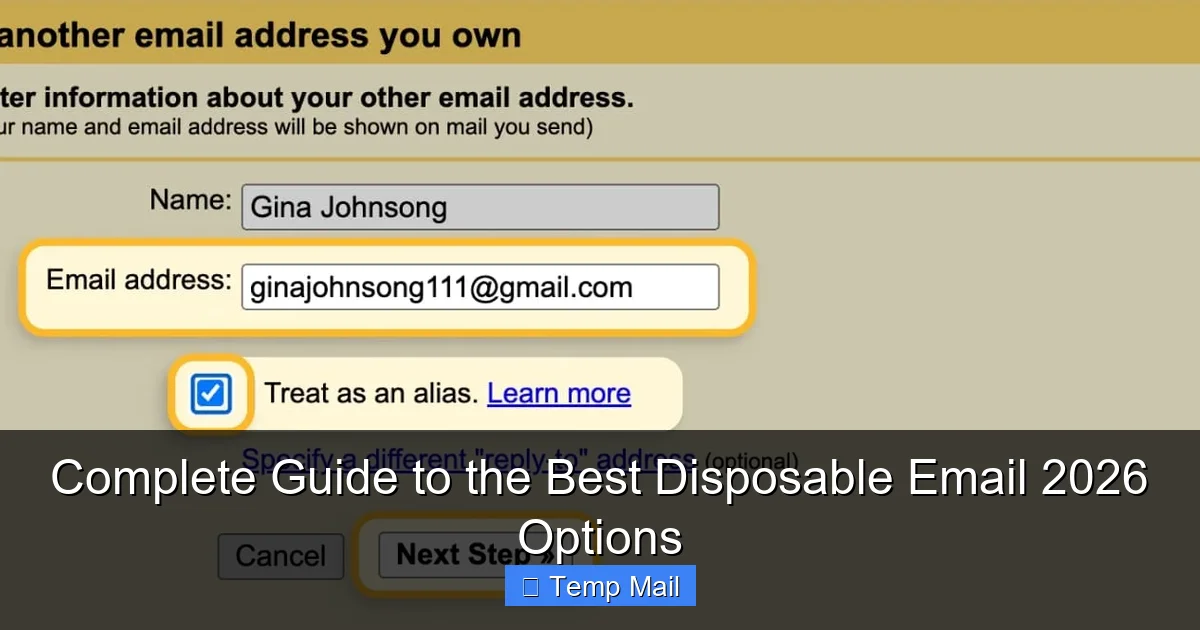
Visual guide about Complete Guide to the Best Disposable Email 2026 Options
Image source: clean.email
Critical Differentiators: What Separates the Good from the Ugly
Not all services are safe. The “ugly” ones can be a privacy nightmare. They might:
- Log your IP address and activity and sell it to advertisers.
- Inject their own ads into the emails you receive, making them look legitimate.
- Have weak security, allowing anyone with the inbox URL to read your emails.
- Block legitimate senders or fail to deliver important verification codes.
The best disposable email 2026 options avoid these pitfalls. They use HTTPS encryption, have clear privacy policies stating they do not log or share data, offer ad-free interfaces (or at least non-intrusive ones), and ensure inboxes are truly isolated from one another. Understanding these mechanics is your first step to choosing wisely.
Why 2026 Is the Tipping Point: 5 Irreplaceable Use Cases
You might think, “I just use my main email for everything.” That’s the old way. Here’s why in 2026, you’ll be reaching for a disposable address almost daily.
Visual guide about Complete Guide to the Best Disposable Email 2026 Options
Image source: opengraph.githubassets.com
1. Slaying the Spam Dragon for Good
This is the classic use. You want to download a free PDF, read an article on a site with a paywall, or enter a contest. Instead of signing up with your [email protected], you use a disposable. The site gets the confirmation it wants, you get the content, and any future “special offers” from that company get sent to an inbox that will vanish in an hour. Your primary inbox stays pristine for family, friends, and true important communications.
2. Secure App and Service Testing Without the Cleanup
Are you a developer, QA tester, or just an early adopter who loves trying new apps and SaaS tools? Creating multiple test accounts with your real email is a management nightmare. With a disposable email service that offers an API or browser extension, you can generate a new address for each test environment in seconds. Once the test is done, the address is dead. No need to manually unsubscribe from 20 different “product update” mailing lists later.
3. Protecting Your Identity During a Data Breach Aftermath
Imagine your favorite online store gets hacked. Your email address and password are now in the hands of criminals. If you used a disposable email for that store, the breach exposes a dead-end address. The hackers have nothing of value to link back to your real identity. For high-risk sites—forums with questionable moderation, sketchy download portals, or one-off forums—using a disposable is a simple form of credential isolation. It contains the blast radius of any future breach.
4. Bypassing Geo-Restrictions and Accessing Gated Content
Many websites, especially news outlets and research platforms, use “email walls.” You can read 3 articles for free, then you must register. Using your real email just to read an article feels like overkill and guarantees marketing emails. A disposable email lets you glide past these gates anonymously. Similarly, some services offer region-locked free trials. A disposable email, combined with a VPN, can help you access these trials without committing your real details.
5. Safeguarding Professional Reputation
For freelancers, consultants, or job seekers, your professional email is your brand. You don’t want it associated with random sign-ups, dubious newsletters, or sites with poor security. Using a disposable for any non-client-related online activity keeps your professional address clean and your digital footprint professional. It’s a subtle but powerful way to manage your online reputation.
The Top 5 Contenders for Best Disposable Email 2026
The market is crowded, but a few services are rising above based on their security commitment, user experience, and innovative features. Here are our top picks for what will define the best disposable email 2026 landscape.
Visual guide about Complete Guide to the Best Disposable Email 2026 Options
Image source: techdaring.com
1. Temp-Mail.org: The Established Powerhouse
Why it’s a top pick for 2026: Temp-Mail has consistently led the pack with reliability and a clean, ad-light interface. It generates a random inbox instantly and allows you to manually refresh the address or extend the lifespan (up to 48 hours on the free tier). Its standout feature for 2026 is the robust browser extension (Chrome, Firefox, Edge) that lets you generate a disposable address directly from any sign-up form with one click, without even leaving the site. It also supports multiple domains (like @tmpmail.org, @tmpmail.net), which helps bypass simple email domain blocks.
Best for: Everyday users and professionals who need speed, reliability, and seamless browser integration. Its established infrastructure means high deliverability rates for verification emails.
Watch out for: The free version has a limited number of inboxes you can generate per day/IP. The “Pro” subscription removes limits and offers custom domain names.
2. Guerrilla Mail: The Veteran with Grit
Why it’s a top pick for 2026: One of the oldest names in the game, Guerrilla Mail has survived by focusing on core functionality and privacy. It gives you a random address and a simple, no-frills inbox. Its key 2026 advantage is its API. Developers and tech-savvy users can integrate Guerrilla Mail into their automated testing scripts or applications, making it invaluable for bulk account creation in controlled environments. It also allows you to reply to emails from within the disposable inbox—a rare and useful feature for brief, anonymous correspondence.
Best for: Developers, testers, and users who need a simple, API-accessible inbox without the fluff. Its longevity speaks to a basic, effective model.
Watch out for: The interface can feel dated. It has more ads than some newer competitors, though they are generally not injected into received emails.
3. 10 Minute Mail (10minutemail.com): The Ephemeral Specialist
Why it’s a top pick for 2026: True to its name, this service’s default inbox lifespan is a mere 10 minutes. This hyper-ephemeral nature is its superpower for maximum anonymity. The site is incredibly simple—a single page with your address and inbox. There are no accounts to create, no cookies to track you beyond the session. For 2026, it represents the purest form of the disposable email concept: extreme temporariness. It’s perfect for that one-time verification where you don’t even want the sender to have the ability to email you back an hour later.
Best for: The most privacy-paranoid users and one-off, instant sign-ups where you need zero persistence. Also great for quick access on public computers.
Watch out for: The 10-minute timer is strict. If you miss a verification email, you’re out of luck. Not suitable for any process that might take longer than 10 minutes.
4. SimpleLogin (Acquired by Proton): The Privacy-First Integrator
Why it’s a top pick for 2026: SimpleLogin (now part of the Proton ecosystem) is not a traditional “temp mail” site. It’s an email alias service, and that’s what makes it a game-changer for 2026. Instead of a random, changing address, you create a permanent, unique alias (e.g., [email protected]) that forwards to your real inbox. You can create hundreds of aliases. The magic? You can disable any alias at any time with a click, instantly stopping all emails. It integrates with Proton Mail for full end-to-end encryption and has fantastic browser extensions and mobile apps. This is the evolution of disposable email: managed, organized, and under your complete control.
Best for: Users who want the organizational benefits of aliases with the “disposable” kill-switch. Ideal for long-term newsletter subscriptions, online shopping accounts, and any service you might want to cut off cleanly later without changing your real email.
Watch out for: It’s a freemium model with limits on free aliases. Requires a (free) Proton or SimpleLogin account to manage aliases, though creation is instant.
5. AnonAddy: The Open-Source Contender
Why it’s a top pick for 2026: For the privacy purist who doesn’t want to trust a single company, AnonAddy offers a unique proposition: it’s self-hostable open-source software. You can use their hosted service (with a generous free tier) or, if you have the technical skill, install it on your own server. This means you have full, auditable control over your data. Like SimpleLogin, it creates forwarding aliases. Its 2026 strength lies in transparency and user sovereignty. Features like “wildcard” aliases (catch-all for a domain) and PGP encryption make it incredibly powerful.
Best for: Tech enthusiasts, security researchers, and anyone who believes in open-source privacy tools. The self-hosting option is the ultimate in trust minimization.
Watch out for: The hosted service has sending limits. Self-hosting requires server maintenance and technical knowledge. The interface is functional but less polished than commercial rivals.
How to Choose YOUR Best Disposable Email 2026: A Decision Framework
With these options, how do you pick? Don’t just default to the first Google result. Ask yourself these questions:
What’s My Primary Threat Model?
Are you mainly fighting spam? Then a simple, fast service like 10 Minute Mail or Temp-Mail is fine. Are you worried about sophisticated trackers or data brokers linking your activity? Then an alias service like SimpleLogin or AnonAddy, which hides your real address from the sender entirely, is superior. Are you a journalist or activist needing strong anonymity? Prioritize services with strong no-logs policies, optional Tor support, and open-source clients (AnonAddy).
Do I Need Browser Integration?
If you find yourself constantly copying and pasting addresses, you need a browser extension. Temp-Mail and SimpleLogin have excellent, one-click extensions that fill forms automatically. This isn’t just convenient; it prevents mistakes where you might accidentally use your real email out of laziness.
What’s My Required Lifespan?
For a quick download, 10 minutes is plenty. For an account you’ll use for a week-long trial, you need 24-48 hours. For a newsletter you want to receive but maybe unsubscribe from later, you need a permanent alias that you can disable. Match the tool to the task duration.
Is Sending From the Disposable Address Needed?
Most disposable email sites are receive-only. If you need to reply to a message or send a quick anonymous email, you must choose a service that supports it. Guerrilla Mail and some alias services (via their forwarding rules) allow limited sending.
Beyond the Inbox: Security, Privacy, and the Evolving Landscape
The Hidden Risks: When “Disposable” Isn’t Secure
A false sense of security is dangerous. Using a disposable email from a provider that logs your IP address or serves malware through ads is worse than using your Gmail. Always check the provider’s privacy policy. Look for statements like “we do not log IP addresses,” “emails are automatically deleted,” and “no data is sold to third parties.” Use services that enforce HTTPS. Be wary of any service that asks you to create an account to use their disposable email—that defeats the purpose of anonymity.
AI, Machine Learning, and the Future of Spam Filtering
In 2026, spammers are using AI to generate more convincing phishing emails and to scrape disposable email domains from the web. The best services are fighting back with AI-powered spam filters of their own, better pattern recognition to block automated sign-up bots, and dynamic domain generation to stay ahead of blocklists. This means the best disposable email 2026 services will be in a constant tech arms race, and the winners will be those investing in this backend intelligence.
Regulation and the Right to Be Forgotten
Laws like GDPR and CCPA give users more control over their data. This impacts disposable email services too. The most compliant services will make it easier to truly delete your data (though with true disposables, data is already auto-deleted). The trend is toward more transparency and user control, which benefits privacy-conscious users.
The Final Word: Making Disposable Email a Habit, Not a Hack
The best disposable email 2026 is not a single service; it’s a strategy. Your strategy should involve using the right tool for the right job. Keep a fast, ephemeral service like 10 Minute Mail for instant, low-stakes sign-ups. Use an integrated alias service like SimpleLogin for anything you might want to manage or revoke later—subscriptions, online accounts, etc. Reserve your primary email for your genuine identity: banking, primary cloud storage, and core communication with your real network.
Adopting this stratified approach to your email identity is one of the simplest, highest-impact privacy upgrades you can make. It contains risk, declutters your mind, and reclaims your attention from the noise of unwanted marketing. As we move deeper into 2026, the digital world will only get more aggressive in harvesting your data. A disposable email isn’t hiding; it’s curating. You are consciously choosing what digital interactions deserve a piece of your real identity and which ones get a temporary, throwaway stand-in. Start today. Pick one service from this guide, install its browser extension, and make your next sign-up your first step toward a cleaner, more private digital life.
Frequently Asked Questions
Are disposable emails legal to use?
Yes, using disposable email services is perfectly legal in most jurisdictions. They are legitimate privacy tools. However, using them for fraudulent activities, to evade legal responsibilities, or to violate a website’s terms of service is illegal. The tool itself is neutral; it’s the intent behind its use that determines legality.
Can websites detect that I’m using a disposable email?
Often, yes. Many websites maintain lists of known disposable email domains and will block sign-ups from them. This is a constant cat-and-mouse game; new disposable domains appear, and blocklists are updated. Services like SimpleLogin and AnonAddy use their own domains that are less likely to be on these lists, making them more effective at bypassing such blocks.
What happens to the emails I receive? Are they really deleted?
On reputable services, yes. Emails are stored temporarily on their servers and are automatically purged after the inbox’s lifespan expires (e.g., 10 minutes, 1 hour, 48 hours) or when you manually delete the inbox. The service’s privacy policy should explicitly state this auto-deletion process. Always review the policy to ensure they don’t archive or back up messages.
Can I send emails *from* a disposable address?
Generally, no for classic “temp mail” sites like 10 Minute Mail or Temp-Mail; they are receive-only. However, alias services like SimpleLogin and AnonAddy allow you to send emails from your alias, which will appear to come from that alias and forward through your real account. Some services like Guerrilla Mail also offer limited reply/send functionality within their interface.
Is it safe to use disposable emails for important accounts like banking or social media?
Absolutely not. You should never use a disposable email for any account where account recovery, security notifications, or legal documents are critical. If you lose access to the disposable inbox, you will be permanently locked out of that bank or social media account. Disposable emails are for low-stakes, non-critical interactions only.
What’s the biggest mistake people make with disposable email?
The biggest mistake is using their primary, personal email for sign-ups they *think* are important but later regret. The second biggest mistake is using a disposable email for something important (like a primary cloud storage or password manager recovery). The correct mindset is to treat your primary email like your home address and disposable emails like a PO box or a friend’s mailbox you use for one package. Reserve the real thing for what truly matters.