Using a temporary email for TikTok sign-up is a smart privacy tactic that shields your primary inbox from spam and potential data breaches. This guide explains exactly how disposable email services work with TikTok, the step-by-step process to create an account, and the critical risks you must understand, such as account termination. We also explore reliable alternatives and essential best practices to keep your temporary TikTok presence secure and effective.
So, you’re thinking about joining the world of TikTok—the endless scroll of dances, life hacks, and niche communities. But the sign-up form asks for your email, and that thought gives you pause. You value your inbox. You’re tired of promotional newsletters crowding your space. You might just want to peek behind the curtain without tying your primary identity to yet another social platform. If that sounds familiar, you’ve likely wondered about using a temporary email for TikTok. You’re not alone. This practice is growing as users become savvier about digital privacy.
This isn’t about doing anything shady; it’s about smart compartmentalization. Think of it like using a pseudonym at a coffee shop instead of your full legal name. You still get your latte (or in this case, your content), but you’ve added a layer of separation. However, navigating this world requires more than just grabbing any disposable address. TikTok has its own rules and detection systems. Using the wrong temp mail can lead to a failed sign-up or, worse, a suspended account down the line. That’s why we’re diving deep. This complete guide will walk you through everything—from the compelling reasons to use a temp mail for TikTok, to the precise step-by-step method, the significant pitfalls to avoid, and the best practices to make it work smoothly. Let’s get your anonymous TikTok journey started the right way.
Key Takeaways
- Temp mail provides a privacy barrier: It separates your real identity from your TikTok account, preventing spam and reducing your digital footprint.
- TikTok may detect and block disposable emails: The platform actively flags known temp mail domains, making service selection crucial.
- Account recovery is impossible with temp mail: If you lose access, you cannot reset your password or recover a TikTok account signed up with a disposable address.
- Use temp mail for specific, limited purposes: It’s ideal for testing, anonymous browsing, or secondary accounts, not for primary creator or monetized profiles.
- Choose a reputable, high-uptime temp mail provider: Unreliable services may deliver emails slowly or not at all, causing sign-up verification failures.
- Never use temp mail for sensitive transactions: Avoid it for any account involving payments, official IDs, or critical personal data.
📑 Table of Contents
- Why Consider a Temporary Email for TikTok?
- How to Choose the Right Temporary Email Service
- Step-by-Step: Signing Up for TikTok with a Temp Mail
- The Critical Risks and Downsides You Must Accept
- Better Alternatives and When to Use Them
- Best Practices for Maintaining Your Temp Mail TikTok Account
- The Final Verdict: Is It Worth It?
Why Consider a Temporary Email for TikTok?
Before we talk about the “how,” let’s solidify the “why.” Understanding the core motivations will help you decide if this strategy aligns with your goals. Using a disposable email address isn’t about being untrustworthy; it’s about taking control of your personal data and managing your online presence with intention.
Primary Benefit: Spam and Marketing Prevention
This is the most immediate and tangible benefit. When you use your main Gmail, Outlook, or Yahoo address for TikTok, you implicitly agree to receive marketing emails. TikTok’s algorithm is designed to engage you, and part of that is email notifications about trending sounds, recommended creators, and promotional offers. While you can unsubscribe, it’s a game of whack-a-mole. A temporary email acts as a dead-end for all that promotional traffic. Once you stop using the temp address, the spam goes with it, leaving your primary inbox pristine.
Enhanced Privacy and Reduced Digital Footprint
Every piece of data you share online contributes to your “digital footprint”—the trail of information you leave behind. Your email address is a key identifier. By using a temp mail, you decouple your real-world identity (or at least your primary email identity) from your TikTok activity. This is particularly valuable for:
- Journalists or activists researching sensitive topics without revealing their affiliation.
- Individuals in oppressive regimes accessing uncensored content.
- Anyone simply wanting to browse trends without being tracked across platforms via their email.
- Parents monitoring app trends without creating a personally identifiable account.
Testing and Exploration Without Commitment
Maybe you’re a social media manager testing a new content strategy. Or a researcher studying platform algorithms. Perhaps you’re just curious about what TikTok is like before committing to it long-term. A temp mail lets you create an account, explore the “For You Page,” and understand the interface with zero long-term obligation. You can delete the account and the email address afterward, leaving no trace. It’s a low-stakes, no-commitment trial period.
Bypassing Regional or Institutional Blocks
In some environments—like certain schools, workplaces, or countries—access to TikTok might be restricted. While a VPN is the primary tool for bypassing geo-blocks, a temporary email adds another layer of separation. It ensures that if your temporary account is ever flagged for unusual login locations (due to VPN use), there’s no risk to your primary email or other accounts linked to it.
How to Choose the Right Temporary Email Service
Not all temp mail services are created equal, and choosing the wrong one is the fastest way to a failed TikTok sign-up. TikTok’s systems are sophisticated and actively scan for domains associated with disposable email providers. Your choice of service is the single most important factor in this entire process. Here’s what to look for.
Visual guide about The Complete Guide to Using Temp Mail for TikTok Sign Up
Image source: static.vecteezy.com
Domain Freshness and Reputation
TikTok maintains a constantly updated blacklist of known disposable email domains. If your temp mail comes from a domain on that list (e.g., mailinator.com, guerrillamail.com—classic examples that are now widely blocked), your verification email will simply never arrive. You need a service that uses less common, regularly rotated domains. Look for providers that advertise “TikTok-friendly” or “social media compatible” domains. These services invest in keeping their domain pools fresh to stay ahead of platform blocklists.
Inbox Accessibility and User Interface
Once you sign up for TikTok, you need to receive that crucial 6-digit verification code. A good temp mail service will:
- Display your inbox publicly on a URL (no login required) for easy access.
- Refresh automatically or have a clear manual refresh button.
- Show emails with clear subject lines (e.g., “TikTok Verification Code”).
- Allow you to copy the code easily without opening the email, which is often faster.
Avoid services that require you to create an account to view emails or have cluttered, ad-heavy interfaces that make finding your verification email a chore.
Email Lifespan and Storage
How long does the inbox exist before it’s deleted? For a TikTok sign-up, you need at least 15-30 minutes of reliable inbox life to receive and enter the code. Most reputable services offer inboxes that last for several hours or until the browser tab is closed. Be wary of services that purge inboxes in under 5 minutes.
Recommended Features to Seek
- No Registration Required: The whole point is anonymity. You shouldn’t need to sign up for the temp mail service itself.
- HTTPS Secure Connection: Ensures your temporary inbox session is encrypted.
- Multiple Domain Options: Some services let you choose from several available domains, increasing your chances of finding one TikTok accepts.
- Clear Advertisements: While most free services have ads, they should be clearly marked and not mimic inbox messages to trick you.
Services to Approach with Caution (or Avoid)
While we won’t endorse specific sites (as they change frequently), the rule of thumb is: if it’s the first result on Google for “temp mail,” TikTok probably already blocks it. The most popular, long-standing disposable email domains are the first to be blacklisted. Seek out newer, less mainstream providers. Read recent user comments or forum posts (like on Reddit) to see which domains are currently working for TikTok sign-ups in the last few weeks.
Step-by-Step: Signing Up for TikTok with a Temp Mail
Alright, theory over. Let’s get practical. Here is the exact, sequential process to follow for the highest chance of success.
Visual guide about The Complete Guide to Using Temp Mail for TikTok Sign Up
Image source: img.adspower.net
Step 1: Secure Your Temporary Email Address
Open a new, private browser window (or incognito mode). Navigate to your chosen, reputable temporary email provider. You will be assigned a random email address (e.g., [email protected]) and taken directly to your inbox page. Keep this browser tab open. Do not close it. Copy the full email address to your clipboard.
Step 2: Initiate TikTok Sign-Up
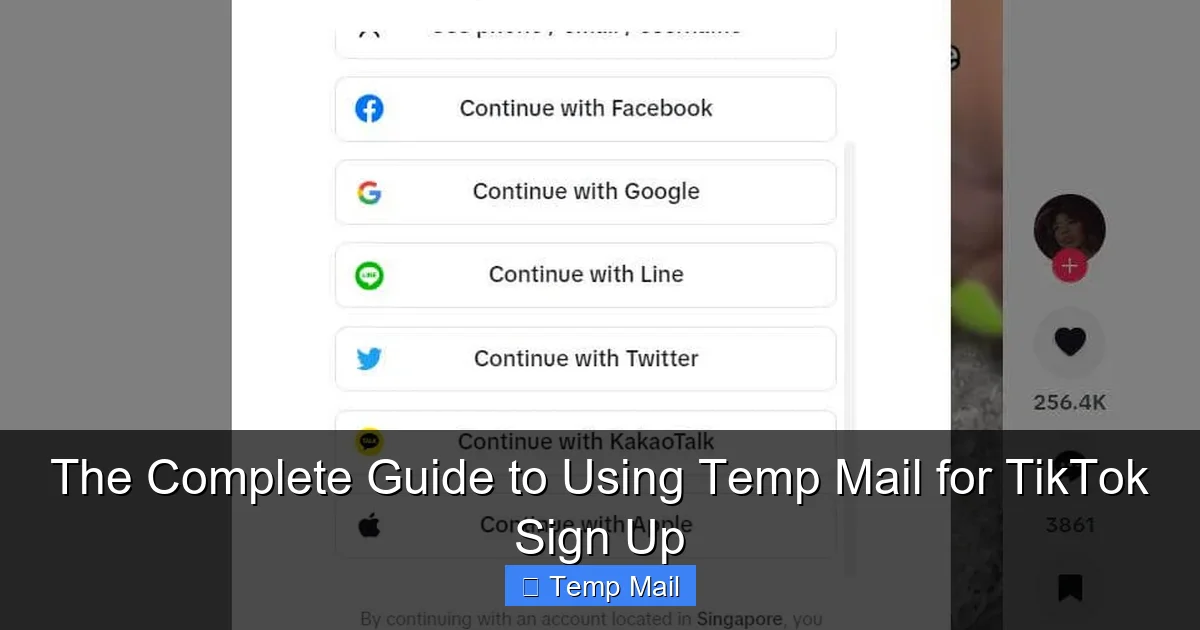
Open the TikTok app or website. Tap “Sign up.” You’ll have options to use your phone number, Google, Facebook, Apple, or email. Select “Email or Phone.” On the next screen, choose “Email.” Paste the temporary email address you just copied into the field. Create a strong, unique password (use a password manager!). Confirm your birthday (TikTok requires you to be 13+).
Step 3: Request and Retrieve the Verification Code
Tap “Send code.” TikTok will immediately attempt to send a 6-digit verification number to your temp address. Now, switch back to your temp mail browser tab. Within 10-30 seconds, a new email should appear in your inbox. The subject is often “TikTok verification code” or similar. Do not click the email. Simply look at the email body on the preview pane. The 6-digit code will be prominently displayed. Copy that code.
Step 4: Complete Verification and Profile Setup
Switch back to TikTok. Paste the 6-digit code into the verification field. Tap “Next” or “Verify.” You should now be logged in! TikTok will prompt you to set up your profile: choose a username (this is public and searchable), add a bio, and set your account to public or private. Complete these steps. Your account is now active.
Step 5: Immediate Post-Sign-Up Actions
This is a critical, often-overlooked step. Once your account is live:
- Download Your Data: Go to your profile > Menu (three lines) > Settings and privacy > Account > Download your data. Request a copy. This gives you a local backup of your profile info, video data, and settings, just in case.
- Link a Recovery Method (CAREFULLY):strong> In the same Settings > Account menu, you can add a phone number. This is a double-edged sword. Adding your real phone number can help if you get locked out, but it also links your real number to the temp mail account. Only do this if the account’s value to you outweighs the privacy loss. For a pure throwaway account, skip this.
- Bookmark Your Inbox: If you plan to use this temp mail for future TikTok notifications (like password reset links), bookmark the exact inbox URL. The address will change if you refresh or get a new one.
The Critical Risks and Downsides You Must Accept
Using a temp mail for TikTok is a trade-off. You gain privacy, but you lose certain guarantees and introduce new risks. Ignoring these can lead to sudden account loss. Here are the hard truths.
Visual guide about The Complete Guide to Using Temp Mail for TikTok Sign Up
Image source: static.vecteezy.com
Risk 1: Permanent Account Loss (The #1 Danger)
If you forget your password and need to reset it, TikTok will send the reset link to the email on file. If that email address no longer exists (because the temp mail service deleted the inbox after a few hours or days), you are permanently locked out. There is no customer support to appeal to. The account, and any videos you posted, are gone forever. This is the single biggest reason temp mail is unsuitable for any account you care about long-term—especially if you’re building a following or creating original content.
Risk 2: TikTok’s Detection and Potential Action
TikTok’s anti-spam and fraud systems are always learning. While your temp mail might work for sign-up, the platform could later flag the account for “suspicious activity” simply because the email domain is known to be disposable. Consequences could range from being forced to re-verify with a different email to a full account ban for “violating Terms of Service” (specifically, providing false or misleading information). The risk is lower for a low-activity account but increases with engagement (likes, comments, posts).
Risk 3: Missed Critical Communications
TikTok doesn’t just send spam. They also send important notifications: copyright strikes, community guideline violation warnings, direct messages from the TikTok Team, and legal disclosures. If these go to a dead inbox, you will never see them. You could violate rules unknowingly and have your account terminated without warning because you missed the initial notice. You are operating blind to any official communication from the platform.
Risk 4: Limited Functionality and Features
Some of TikTok’s features, especially those tied to monetization or age verification, may require a “verified” email or phone number. A disposable email will likely fail these checks. You cannot:
- Join the TikTok Creator Fund.
- Run ads or use TikTok’s business tools.
- Verify your age if you are over 18 (for some features).
- Link certain third-party apps or services that require a “real” email.
Your account will be permanently restricted to basic, non-commercial use.
Better Alternatives and When to Use Them
Given the risks, is a temp mail always the answer? Not necessarily. Here are better, more sustainable alternatives for different use cases.
Alternative 1: A Dedicated “Junk” Email Address
This is the gold standard for most users. Create a new email account with a major provider (Gmail, Outlook, ProtonMail) using a pseudonym. Use this address only for social media sign-ups and newsletters. This achieves 95% of the spam-prevention benefit of a temp mail, but with 100% of the reliability. You control the inbox forever. You can reset passwords, receive important notices, and the account won’t be flagged for using a disposable domain. The only “cost” is managing one more email login, but password managers make this trivial.
Alternative 2: Apple’s “Hide My Email” (for iOS/Mac Users)
If you’re in the Apple ecosystem, this is a fantastic built-in solution. When signing up for an app or service, you can choose to generate a unique, random email address that forwards to your real iCloud email. You can disable this forwarding at any time, effectively killing the address and all future emails from that sender. It’sprivate, reliable, and managed seamlessly through your Apple ID. TikTok should accept these unique @icloud.com addresses without issue.
Alternative 3: Firefox Relay
Mozilla offers a free service that provides 5 random email masks (e.g., [email protected]) that forward to your real email. It’s simple, privacy-focused, and the masks are not on common blocklists. If one starts getting spam, you can delete that specific mask without affecting your others. It’s a great middle-ground between full temp mail and a dedicated junk account.
When is a True Temp Mail Still Appropriate?
Stick with a true disposable email only for these specific, low-stakes scenarios:
- One-time research: You need to see what a TikTok trend is about for a 10-minute session.
- Testing an automated tool or bot: You’re developing something and need a throwaway account for testing.
- Accessing a single, specific video or live stream that is geo-restricted and requires a login, but you will never interact with the platform otherwise.
If you plan to like, comment, follow, or post—even once—seriously consider the dedicated email alternatives above.
Best Practices for Maintaining Your Temp Mail TikTok Account
If you’ve decided a temp mail is the right tool for your specific need, follow these best practices to maximize your success and minimize headaches. Think of this as your operational manual.
Practice 1: Document Everything Immediately
The moment your account is created, take a screenshot or write down in a secure note:
- The temporary email address used.
- The TikTok username.
- The password (if you didn’t use a password manager, which you should).
- The date of creation.
Store this information somewhere safe, separate from the temp mail inbox. If you need to reference it later, you have it.
Practice 2: Use a Strong, Unique Password
Do not use a password you use anywhere else. Even though the account is “temporary,” a compromised TikTok password could be used in credential stuffing attacks against your other accounts if you reused it. Use your password manager to generate and store a random, 16-character password.
Practice 3: Limit Account Activity and Value
The less you do with the account, the lower the risk. Use it for passive browsing. Avoid:
- Posting original videos (this increases engagement flags).
- Following hundreds of accounts.
- Leaving inflammatory comments.
- Engaging in any behavior that would violate TikTok’s Community Guidelines.
Treat it as a window, not a home.
Practice 4: Have an Exit Strategy
Know how you will delete the account when you’re done. Go to Settings and privacy > Account > Deactivate account. Deleting from within the app is the only surefire way to remove your data. Simply abandoning the temp email does not delete your TikTok profile; it just makes it inaccessible.
Practice 5: Never Use for Verification Elsewhere
Do not use this TikTok account (and its associated temp email) to sign up for other important services like banking, cloud storage, or other social media platforms. The fragility of the email address will cascade, locking you out of multiple accounts.
The Final Verdict: Is It Worth It?
After all this, what’s the bottom line? Using a temp mail for TikTok sign-up is a valid tool in the privacy toolkit, but it’s a specialized one with sharp edges. Its value is highest for users who need absolute, temporary anonymity for a single, brief session of content consumption or research. For anyone who wants to interact with the platform beyond passive viewing—even to just save a favorite video or follow a creator—the risks of permanent loss and detection outweigh the benefits.
The smarter path for 90% of users is to create a dedicated “social media” email address. It costs nothing but a few minutes to set up, it’s infinitely more reliable, and it protects your primary inbox just as well. Combine that with a strong, unique password, and you have a robust, sustainable solution for using TikTok (or any social platform) on your own privacy terms. Reserve the true disposable email for those moments when you need to be a ghost in the machine, here today and gone tomorrow, with no strings attached. Use it wisely, understand the risks, and you can explore TikTok’s vibrant world without compromising your core digital identity.
Frequently Asked Questions
Will TikTok ban my account for using a temp mail?
It’s possible, but not automatic. TikTok’s systems flag known disposable email domains. If your temp mail domain is on their blocklist, you may be unable to sign up. If you sign up successfully but the domain is later identified, TikTok could restrict your account or require a new email. The risk is higher for accounts that show unusual activity patterns.
Can I recover my TikTok account if I lose my temp mail password?
Almost certainly not. Account recovery relies on access to the registered email or phone number. Since a temporary email address expires and becomes inaccessible, there is no way to receive a password reset link. The account will be permanently locked. This is the most significant downside of using temp mail.
What happens to my TikTok videos if my temp mail expires?
The videos remain on TikTok’s servers as long as the account exists. However, without access to the email, you cannot log in to manage, delete, or download them if you get locked out. The account becomes a “zombie”—it exists, but you have no control over it.
Is there a temp mail service that 100% works with TikTok?
No. There is no guarantee. TikTok constantly updates its blocklists. A domain that works today may be blocked tomorrow. The strategy is to use a less common, reputable temp mail provider known for fresh domains, but success is never 100% guaranteed due to the dynamic nature of these blocklists.
Should I use my real phone number with a temp mail TikTok account?
It defeats the purpose. Adding your real phone number links your primary identity to the account, eliminating the privacy benefit. It also gives TikTok another direct communication channel. Only add a phone number if you absolutely must have a recovery method and are willing to sacrifice some anonymity. For a true temp account, skip phone verification entirely.
What’s the single best alternative to a temp mail for TikTok?
Creating a dedicated, new email address from a major provider (like Gmail or Outlook) using a pseudonym is the best alternative. It’s permanent, reliable, not on blocklists, and still separates your TikTok activity from your primary personal or work email. It provides the privacy benefit without the fragility of a disposable inbox.