Temporary email software provides disposable email addresses that shield your primary inbox from spam, phishing, and data harvesting. These tools are essential for securely signing up to websites, downloading resources, or verifying accounts without exposing your real identity. By auto-deleting messages after use, they offer a simple yet powerful layer of digital privacy for everyday browsing.
Key Takeaways
- Disposable addresses protect your primary email: Temporary email software generates unique, short-lived addresses that prevent spam and marketing lists from ever touching your real inbox.
- It significantly reduces phishing risks: By using a throwaway address for unfamiliar sites, you isolate potential phishing attempts and malicious links away from your main accounts.
- No long-term digital footprint is created: Messages and the address itself are automatically destroyed, ensuring no persistent data trail linked to your identity is left behind.
- It streamlines one-time verifications: Perfect for quickly accessing gated content, forum sign-ups, or app trials without commitment or inbox clutter.
- Not for critical or legal communications: Never use temporary email for banking, official government correspondence, or primary account recovery, as addresses are ephemeral.
- Choose reputable providers for security: Opt for services with clear privacy policies, no-log claims, and encryption to ensure your temporary activity remains private.
- It’s a complementary privacy tool: Temporary email works best alongside a VPN, password manager, and ad-blocker for a holistic privacy strategy.
📑 Table of Contents
- Your Inbox is a Target: Why You Need a Digital Shield
- What Exactly is Temporary Email Software?
- The Multifaceted Benefits of Using Temp Mail
- Practical Use Cases: When to Reach for Temp Mail
- Choosing the Right Temporary Email Software
- Best Practices and Crucial Limitations
- Building a Holistic Privacy Strategy
- Conclusion: Embrace the Ephemeral for Lasting Peace of Mind
Your Inbox is a Target: Why You Need a Digital Shield
Think about your primary email address. It’s likely the master key to your digital life. It’s tied to your social media, your bank, your work, and countless online accounts. Every time you type it into a website—a new forum, a discount offer, a free e-book download—you are handing over a piece of your digital identity. That data is often sold, shared, or breached. The result? A flood of spam, targeted ads that feel intrusive, and a constant, low-grade anxiety about your privacy. This is where temporary email software becomes your first line of defense. It’s not about hiding anything nefarious; it’s about reclaiming control and treating your primary email like the valuable asset it is.
Using a temporary email service is a simple shift in behavior with profound privacy benefits. Instead of offering your real address, you use a disposable one that exists for 10 minutes, an hour, or a day. Once its purpose is served, it vanishes. This practice, often called “temp mail,” breaks the chain of data collection that starts with your email. In this guide, we’ll explore exactly how this technology works, its tangible benefits, and how you can seamlessly integrate it into your daily digital routine to enhance your online privacy.
What Exactly is Temporary Email Software?
The Core Concept: Disposability and Anonymity
At its heart, temporary email software is a service that provides you with a random, non-personal email address for a short, predefined period. Unlike traditional email providers like Gmail or Outlook, which are designed for permanent, long-term communication, temp mail is built for transience. The software generates an inbox on their server, assigns it a random address (e.g., [email protected]), and gives you a public link to view incoming messages. No password is typically required for the basic view, emphasizing speed and ease over secure storage.
Visual guide about Enhance Online Privacy Using Temporary Email Software
Image source: temporaryfencingstore.com
How It Works: A Step-by-Step Breakdown
The process is intentionally frictionless. First, you visit the temporary email software website or use its browser extension. The service instantly generates a new email address for you, which is displayed prominently on the homepage. You copy this address and paste it into the website that requires an email sign-up. Any verification or welcome email sent to that address appears in the temp mail service’s public inbox interface, which is usually auto-refreshing. You click the message, get your link or code, and complete the sign-up. After a set time—often 10 minutes to 48 hours—the entire inbox and address are permanently deleted from the server. There is no “sent” folder, no storage history, and no way to recover it.
The Multifaceted Benefits of Using Temp Mail
1. Slash Spam and Marketing Clutter
This is the most immediate and noticeable benefit. Every time you use your primary email for a sketchy download site or a one-off newsletter, you’re signing up for future spam. With temporary email software, that spam target is a dead address. It will receive the initial emails, but after the session ends, that address is gone. The spammer has no way to re-contact you because the address no longer exists. Your primary inbox remains a sanctuary for personal and important communications only.
Visual guide about Enhance Online Privacy Using Temporary Email Software
Image source: atempmail.com
2. Fortify Your Defenses Against Phishing
Phishing emails are designed to look legitimate and trick you into clicking malicious links or entering credentials on fake sites. If such an email lands in your main inbox, there’s a risk of accidental engagement. By using a temp address for non-essential sign-ups, you create a quarantine zone. Any phishing attempt targeting that disposable address is completely isolated. Even if you click a link out of curiosity, the attacker has no connection to your real identity or primary accounts, rendering the attack largely ineffective.
3. Preserve Anonymity and Limit Data Trails
Every online action leaves a data footprint. Your email address is a primary identifier. Using a different, random temporary email for each new service makes it vastly harder for companies to build a cohesive profile of your behavior across the web. Ad networks and data brokers rely on consistent identifiers like your email to track you. By frequently rotating through disposable addresses, you fragment your digital shadow, making any single profile less accurate and valuable.
4. Bypass Annoying Sign-Up Walls
How many times have you abandoned a useful article or tool because it demanded an email you didn’t want to give? Temporary email software removes that barrier. You can instantly generate an address, get the download link or content, and move on. It’s a tool for empowerment, allowing you to access information without the permanent trade-off of your contact details.
Practical Use Cases: When to Reach for Temp Mail
Knowing the theory is one thing; seeing it in action is another. Here are common, everyday scenarios where temporary email software shines.
Visual guide about Enhance Online Privacy Using Temporary Email Software
Image source: structurehaus.com
Downloading Gated Content (E-books, Whitepapers, Templates)
A marketing site offers a valuable PDF guide in exchange for your email. This is a classic lead generation tactic. Using your primary email means you’ll likely be added to their sales email sequence. Instead, use a temp address. Download the file, and when the follow-up emails arrive days later, they bounce into a void. The content is yours, with no ongoing relationship.
Signing Up for New Online Services or Apps
You heard about a new photo editing app or project management tool and want to try it. The sign-up page asks for an email. Before you commit to using it long-term, use a disposable address. This lets you explore the service’s features, test its utility, and decide if it’s worth integrating into your life with your real credentials. If you decide against it, there’s no cleanup needed—the temp address dies, and so does your association with the service.
Accessing Wi-Fi in Public Places (Hotels, Airports, Cafes)
Many public Wi-Fi networks require you to accept terms or register with an email address. This is a prime opportunity for data collection by the venue or their partners. A temporary email satisfies this requirement without linking the network usage to your identity.
Forum or Comment Section Registrations
You want to post a comment on a news article or join a discussion on a niche forum. These platforms often require registration. Using a temp email allows you to participate without creating a permanent account tied to your main email, which could be used to track your opinions or send you forum digests.
One-Time Verification for Client or Customer Work
Freelancers or small business owners might need to verify an account on a client’s preferred platform. Using a temp email for this specific, one-off verification keeps your professional or personal email separate and uncluttered.
Choosing the Right Temporary Email Software
Not all temp mail services are created equal. While the core function is similar, features, usability, and privacy policies differ. Here’s what to evaluate.
Key Features to Look For
- Inbox Lifespan Options: Some services offer 10-minute addresses, others allow 1-hour, 1-day, or even 1-week options. Choose based on your anticipated need. A quick verification needs only 10 minutes; a multi-day trial might need 24-48 hours.
- Browser Extensions: The best temporary email software offers a browser extension (Chrome, Firefox, Edge). This is a game-changer for convenience. The extension can auto-fill the temp address into web forms with a single click, eliminating copy-paste steps.
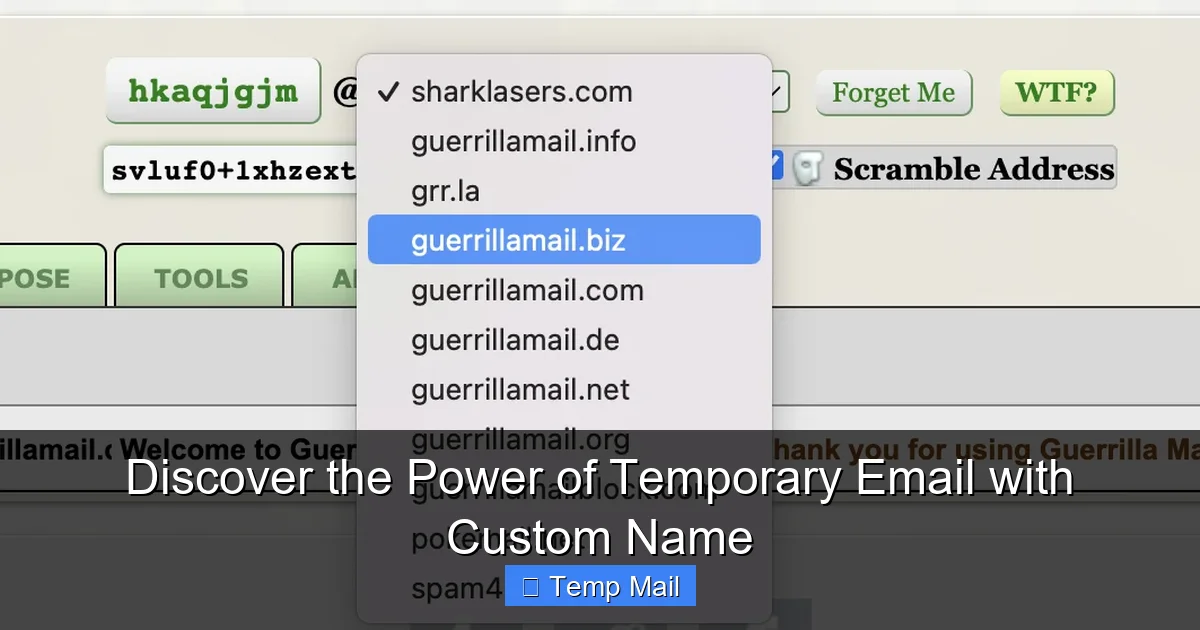
- Custom Domain Options: Some advanced services let you generate an address from a custom domain (e.g., [email protected] vs. a random string). This can be slightly more memorable if you need to check it manually later.
- API Access: For developers or automated testing, some providers offer an API to programmatically generate and manage temporary addresses.
Critical Security and Privacy Considerations
You are trusting a third party with the emails sent to this address. While they are “temporary,” they may contain sensitive verification codes or links during their lifespan.
- No-Logs Policy: Does the provider explicitly state they do not log IP addresses or store message content after deletion? Read their privacy policy.
- HTTPS Encryption: Ensure the website uses HTTPS. This encrypts the connection between your browser and their server, preventing eavesdropping on the inbox contents while it’s active.
- Open Source Code: Some reputable services open-source their code, allowing for community audits and greater trust in their operations.
- Ad-Supported vs. Premium: Free services often display ads on their interface. Be mindful of this. Paid or premium tiers typically remove ads and may offer longer inbox durations or enhanced features.
Popular and Reputable Providers
Names like Temp-Mail, 10MinuteMail, Guerrilla Mail, and Dropmail are well-established. They have proven track records of reliability and clear, transparent policies. Avoid obscure, ad-heavy sites that look suspicious. Stick with providers that have been around and are frequently recommended in privacy-conscious communities.
Best Practices and Crucial Limitations
To use temporary email software effectively and safely, you must understand its boundaries. It is a powerful tool, but it has clear “do not use” cases.
The Golden Rule: Never for Critical Accounts
This cannot be stressed enough. Do not use a temporary email for:
- Banking, financial services, or cryptocurrency exchanges. You will lose access to statements, security alerts, and password reset links forever.
- Primary email account recovery. If you lock yourself out of your Gmail or Apple ID, you need a permanent, accessible recovery email.
- Government services, legal documents, or official correspondence. These require a verifiable, stable point of contact.
- Any service you intend to use long-term. If you plan to keep an account for years, use your primary or a dedicated secondary email from a standard provider.
Practical Tips for Seamless Integration
- Use a separate, dedicated secondary email for semi-permanent needs. For services you might use for a few months (like a streaming trial you’ll cancel), consider creating a free email address specifically for this purpose. It’s a middle ground between your primary inbox and a 10-minute temp mail.
- Don’t rely on it for password resets. If you sign up for a service with a temp email and later forget your password, you are locked out. The reset link goes to an address that no longer exists.
- Check the inbox promptly. If you’re using a 10-minute address, don’t walk away. Have the tab open and refresh until the verification email arrives.
- Assume the inbox is public. While unlikely, the inbox URL could be guessed. Never use temp mail for sending sensitive personal information *to* someone else. Its purpose is receiving verification emails, not confidential communication.
- Combine with a password manager. When you sign up for a service with a temp email, use your password manager to generate and store a strong, unique password for that account. This way, even if you lose access to the temp email, the account itself is secured with a robust password you control.
Building a Holistic Privacy Strategy
Temporary email software is a fantastic tool, but it’s just one piece of the online privacy puzzle. Think of it as a specialized shield for a specific kind of attack—the email-based data collection and spam vector. For comprehensive protection, layer it with other practices.
The Foundational Trio: VPN, Password Manager, and Temp Mail
1. A reputable VPN (Virtual Private Network): Encrypts all your internet traffic and masks your IP address, hiding your physical location from the websites you visit. While temp mail hides your identity via your email, a VPN hides your network identity.
2. A dedicated password manager: Tools like Bitwarden, 1Password, or Dashlane create and store complex, unique passwords for every site. This prevents credential-stuffing attacks where a breached password from one site is used to access another. Your primary email password, stored here, is your most critical.
3. Your new best friend: temporary email software: Use it consistently for all non-essential, one-off, or suspicious sign-ups. This breaks the link between your online activity and your core identity.
Additional Layers: Browser Hardening and Mindful Browsing
Install uBlock Origin or a similar ad-blocker to stop trackers and malicious ads. Use privacy-focused search engines like DuckDuckGo. Be skeptical of any site that asks for more information than it absolutely needs. The goal is to minimize your data exposure at every turn. Temporary email addresses are the low-effort, high-reward first step in this mindset shift.
Conclusion: Embrace the Ephemeral for Lasting Peace of Mind
In an internet economy built on data harvesting, every piece of personal information you withhold is a victory for your privacy. Temporary email software is an elegantly simple solution to a pervasive problem. It costs nothing but a moment of habit change, yet it delivers a clean primary inbox, a fragmented digital footprint, and a significant reduction in your exposure to spam and phishing. By understanding its strengths—and its critical limitations—you can wield this tool with confidence.
Start today. The next time a website asks for your email to read an article or download a wallpaper, pause. Open a new tab for your temp mail provider of choice, grab a disposable address, and complete the transaction. Experience the quiet satisfaction of knowing that address will be gone in an hour, taking the potential for spam and data linkage with it. Your future self, with a cleaner, safer inbox, will thank you. Take control of your digital doorstep; begin by handing out keys that only work once.
Frequently Asked Questions
Is using temporary email software legal?
Yes, using temporary email services is completely legal. They are legitimate privacy tools. The legality issues arise only if someone uses a disposable address for illegal activities like fraud or harassment, which is true of any communication tool.
Can temporary emails be traced back to me?
Generally, no. The services do not require registration or personal details, so there is no account linking you to the address. However, your internet activity could potentially be traced via your IP address by the temp mail provider itself, which is why choosing a reputable service with a strict no-logs policy is crucial.
What’s the difference between a temporary email and a secondary permanent email?
A secondary permanent email (e.g., a dedicated Gmail account) is a stable, long-term address you control and can access indefinitely. It’s good for semi-regular services. A temporary email is ephemeral, designed to exist for minutes or hours, and is never meant for recovery or long-term use. It creates no lasting association.
How long do temporary emails typically last?
It varies by provider. Common lifespans are 10 minutes, 1 hour, 1 day, or 1 week. The address and all its messages are permanently deleted after this period. Always check the specific timer on the service you are using.
Will websites block or detect temporary email domains?
Many popular temp mail domains are known and blocked by major platforms (like Google or Facebook) to prevent abuse. You may find the sign-up is rejected. For less scrupulous or smaller sites, they often work fine. This is a cat-and-mouse game, with new domains constantly emerging.
Can I send emails from a temporary address?
Most basic, free temporary email services are receive-only. They are designed for you to *get* a verification code, not to *send* emails. Some advanced or premium services may offer limited sending capabilities, but it is not their primary function.