Tired of your primary email getting bombarded with spam after every online sign-up? Using a temporary email for verification acts as a powerful shield, protecting your real identity and inbox from unwanted clutter, data breaches, and aggressive marketing. It’s a simple, free tool for anyone who values digital privacy, allowing you to access gated content, test services, and register securely without compromise. This guide shows you exactly how and when to use disposable emails wisely.
You’re clicking through the internet, maybe reading a great article, and you hit a wall. “Subscribe to our newsletter to read more!” or “Enter your email to download this free ebook.” You sigh. That’s one more place that will get your email, and one more potential source of spam cluttering your carefully managed inbox. What if there was a simple, free, and incredibly effective way to bypass that wall without giving away your real digital home? That’s exactly what a temp mail for verification provides. It’s not a hack; it’s a privacy tool as essential as a strong password. Think of it as a trusted, anonymous assistant who handles the minor, tedious tasks for you so your main identity stays safe and clean. In this deep dive, we’ll explore why this simple tool has become a cornerstone of digital hygiene for millions and how you can master its use.
Key Takeaways
- Primary Defense: A temporary email address is your first line of defense against spam, phishing attempts, and data harvesting linked to your permanent identity.
- Simple Process: Using temp mail is effortless: generate a disposable address, use it for the required verification, then discard it once done.
- Versatile Application: Ideal for signing up for new platforms, downloading resources, accessing forums, and testing website registrations.
- Privacy Preservation: It prevents companies from building a marketing profile based on your primary email and reduces your digital footprint.
- Not for Everything: Critical accounts like banking, primary cloud storage, or main communication channels should NEVER use a disposable address.
- Tool, Not a Shield: While excellent for privacy, temp mail does not make you anonymous online; use it alongside other security practices like strong passwords and VPNs.
📑 Table of Contents
- Why Our Inboxes Are Under Siege (And How Temp Mail Wins)
- How Does Temp Mail Actually Work? A Step-by-Step Guide
- The Practical Playbook: When & Where to Use Disposable Emails
- The Critical “Don’ts”: Where NOT to Use a Temp Mail
- Choosing a Service & Best Practices for Maximum Privacy
- The Bigger Picture: Temp Mail as Part of a Holistic Privacy Strategy
- Conclusion: Embrace the Disposable, Secure the Essential
Why Our Inboxes Are Under Siege (And How Temp Mail Wins)
Let’s set the scene. Your primary email address—the one linked to your bank, your family, your work—is a golden ticket. It’s a unique identifier tied directly to you. Every time you use it to sign up for a new app, forum, or discount offer, you’re handing over a piece of that identity. Companies sell these lists. Data breaches expose them. Automated bots scrape them from poorly secured websites. The result? A relentless tide of promotional blasts, phishing lures, and “special offers” you never asked for. This isn’t just annoyance; it’s a privacy erosion. The more places your email lives, the larger your digital footprint becomes, and the easier you are to profile, target, and potentially exploit.
The Spam Cascade: From One Sign-Up to Inbox Overload
It often starts innocently. You find a cool new productivity tool, so you enter your Gmail to try it. That company, in its privacy policy buried in legalese, reserves the right to share your data with “partner networks.” Suddenly, you’re getting ads from companies you’ve never heard of. Worse, if that company suffers a breach (and they happen daily), your email and password are now in the hands of criminals. They’ll try that combination on your bank, your social media, your Amazon account. Using your main email everywhere is like using the same master key for your house, car, and office—a catastrophic single point of failure.
How a Disposable Address Breaks the Chain
This is where temp mail for verification changes the game. You generate a random, throwaway email address from a service like Temp-Mail, Guerrilla Mail, or 10MinuteMail. You use that address to sign up for the productivity tool. The verification email goes to the disposable inbox (which you can often view right on the temp mail site), you click the link, and you’re in. Your primary email? It never touched that transaction. If the company gets breached or sells the list, the compromised address is a dead end. It leads to a virtual void. You simply close that browser tab, and that disposable identity vanishes into the ether, taking any future spam destined for it with it. You’ve successfully isolated that online interaction from your real life.
How Does Temp Mail Actually Work? A Step-by-Step Guide
The magic of temporary email is its beautiful simplicity. There’s no complex setup, no software to install, and certainly no payment required for the basic function. Let’s walk through the typical user journey, which takes less than a minute.
Visual guide about Temp Mail for Verification Is Your Key to Privacy
Image source: strapi.smsverified.com
Step 1: Generation – Your Instant, Anonymous Inbox
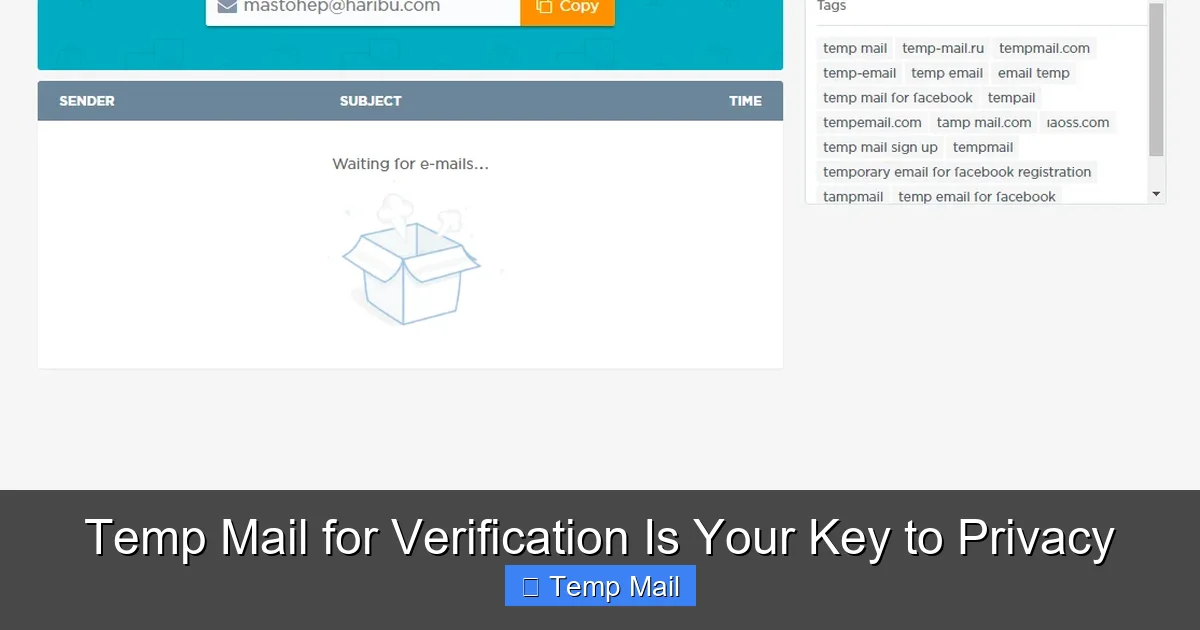
You navigate to a reputable temp mail provider website. Instantly, the page generates a random email address for you, something like [email protected]. Alongside it, you’ll see a button or tab that says “Inbox.” This is your temporary mailbox. It’s live, active, and ready to receive emails right now. The best services don’t even require you to create an account; the anonymity is baked into the process.
Step 2: Utilization – Copy, Paste, Verify
You’re on the website that demands your email. You highlight and copy that randomly generated address. You paste it into the sign-up or download form. You submit the form. The website sends a verification email to your disposable address. You click back to your temp mail tab, refresh the inbox, and see the new email arrive. You open it and click the verification link or copy the code. You’ve just completed the process using an address that has no connection to your name, your other accounts, or your permanent inbox.
Step 3: Disposal – The “Burn After Reading” Philosophy
Once you’ve verified the account or downloaded the file, your work is done. You can simply close the browser tab. The temporary email address and all its associated emails typically expire after a set period—often 10 minutes to a few hours, depending on the service. Some services allow you to manually delete it or extend the time. The key is that you have zero obligation to it. No need to unsubscribe later (because you never subscribed with your real email). No need to manage it. It just disappears, leaving no trace behind.
The Practical Playbook: When & Where to Use Disposable Emails
Knowing how to use a temp mail is one thing; knowing when to use it is the real skill. Applying it to the right scenarios maximizes your privacy and minimizes future headache. Think of it as your go-to tool for any online interaction that is transactional, temporary, or low-stakes.
Visual guide about Temp Mail for Verification Is Your Key to Privacy
Image source: i.ytimg.com
1. Gated Content & Lead Magnets
This is the most common and perfectly justified use case. That “free ebook,” “whitepaper,” “template pack,” or “webinar recording” that requires an email? Use a disposable address. You get the content immediately, and you avoid being added to a marketing list you never wanted. The company gets their “lead,” and you get your privacy. It’s a clean, win-win transaction with no long-term commitment.
2. One-Time Forum or Community Registration
Want to ask a question on a niche forum, join a subreddit’s chat, or participate in a Discord server that requires email verification? A temp mail is perfect. You gain access to the community for your single discussion or project, and you don’t have to worry about the forum’s security practices or their future email spam. Once your question is answered or your project is done, the disposable address expires, severing that connection.
3. Testing Website & App Sign-Up Flows
Are you a developer, UX designer, or just a curious power user testing how a new website’s registration process works? Use a temp mail to create test accounts repeatedly without polluting your real inbox or creating dozens of unused accounts under your name. It’s an essential tool for quality assurance and personal exploration.
4. Accessing “Free Trials” Without the Commitment
That 30-day free trial for a SaaS tool looks tempting, but you know the drill: they’ll ask for your email and will aggressively market to you forever, even after you cancel. Use a temp mail for the trial verification. You can test the software risk-free. When the trial ends, the email is gone, and so is their direct line to you. (Note: For paid services, you’ll still need a real payment method, but the email can be disposable).
5. Downloading from Less-Trusted Sources
You’re on a blog or archive site offering a useful software patch, driver, or open-source tool. They require an email to download. If you don’t fully trust the site’s reputation or its email handling practices, a disposable address is a smart buffer. It protects you from potential email harvesting or future unwanted correspondence from that source.
The Critical “Don’ts”: Where NOT to Use a Temp Mail
While powerful, a disposable email is not a universal replacement for your primary address. Using it in the wrong context can cause real problems, locking you out of important accounts and services. This is the most crucial part of this guide: understanding the limits.
Visual guide about Temp Mail for Verification Is Your Key to Privacy
Image source: tempail.com
Financial, Legal, and Government Services
Never, ever use a temp mail for your bank, credit card, investment account (like PayPal, Stripe), loan provider, or tax software (TurboTax, H&R Block). These services require a verified, permanent email for security alerts, legal statements, password recovery, and official communication. Using a disposable address here is a recipe for disaster—you will be locked out, and recovery will be a nightmare.
Your Primary Cloud & Communication Hubs
This includes Google (Gmail), Microsoft (Outlook/Office 365), Apple (iCloud), and your main social media accounts (Facebook, Twitter/X, Instagram, LinkedIn). These are your digital identity anchors. Password resets, security notifications, and friend requests all flow through here. If the disposable address vanishes, you lose access to the entire account. These must be secured with a strong, permanent email you control forever.
Long-Term Subscriptions & Essential Services
Your Netflix, Spotify, Amazon, Uber, or food delivery app accounts should all be tied to your real email. Why? For receipts, subscription management, account recovery, and important service updates. Imagine needing to reset your Amazon password and finding the recovery email no longer exists. The same goes for any service you intend to use for months or years.
Job Applications & Professional Networking
When you’re applying for a job or building a professional profile on LinkedIn, you want to appear reliable and reachable. A [email protected] looks unprofessional and suggests you have something to hide or are not serious. Use your polished, professional personal email for all career-related activities.
Choosing a Service & Best Practices for Maximum Privacy
Not all temp mail services are created equal. Some offer more features, better security, and longer lifespans than others. Here’s what to look for and how to use any service responsibly.
Features to Look For in a Temp Mail Provider
First, seek a service that provides a real, functional inbox interface. Some cheap services just generate an address but don’t receive emails reliably. You need to see the emails arrive. Look for options to extend the email’s life (e.g., from 10 minutes to 1 hour) if you need more time. A password protection feature for the inbox can be useful if you step away from your computer. Finally, check if the service has a clear privacy policy stating they do not log or store your emails after deletion. Reputable services treat your disposable session as private.
Pro-Tips for the Discreet User
- Use a Private/Incognito Browser Window: This prevents the temp mail site from being logged in your browser history and avoids cookie tracking from your main browsing session.
- Never Reuse the Same Disposable Address: The whole point is one-time use. Generating a new random address for each new site is best practice. Reusing one defeats the purpose of isolation.
- Don’t Use It for Password Recovery Anywhere Important: This bears repeating. If you set a recovery email to a disposable address for an important account, you have effectively created a landmine for your future self.
- Assume the Inbox is Public: While services aim to be private, treat the temporary inbox as if someone else could see it. Never receive sensitive personal information (like medical records or financial statements) at a disposable address.
The Bigger Picture: Temp Mail as Part of a Holistic Privacy Strategy
Relying solely on a temp mail for verification is like locking your front door but leaving all your windows wide open. It’s a fantastic tool for a specific job—email isolation—but it’s just one component of a robust digital privacy posture. To truly protect yourself, layer this practice with other habits.
Layering Your Defenses
Use a password manager to generate and store unique, complex passwords for every important account. This prevents a breach on one site from compromising all your others. Employ a reputable Virtual Private Network (VPN) when on public Wi-Fi to encrypt your internet traffic. Be vigilant about app permissions on your phone and computer, revoking access to your location, contacts, and microphone for apps that don’t need it. Finally, cultivate a mindset of data minimization: ask yourself “Do they really need this?” before providing any personal detail, email, or phone number. The temp mail is your answer to that question when it comes to email addresses.
Conclusion: Embrace the Disposable, Secure the Essential
In an online world designed to harvest your data and bombard your attention, taking control of your email footprint is a powerful act of self-defense. Using a temp mail for verification is not about being sneaky or dishonest; it’s about being prudent and intentional. It’s the digital equivalent of using a PO box for your junk mail or giving a fake number to an overly pushy salesperson. You are not lying; you are drawing a necessary boundary. By reserving your precious, permanent email address for the critical pillars of your life—banking, family, primary cloud storage, and essential subscriptions—and using disposable addresses for everything else, you dramatically reduce spam, minimize your exposure to data breaches, and reclaim your inbox as a space for communication that truly matters. Start today. The next time a website asks for your email to read an article or download a guide, pause. Open a new tab, generate a temp mail, and verify. Your future self, with a clean and peaceful inbox, will thank you.
Frequently Asked Questions
Is using a temporary email address legal?
Yes, absolutely. Using disposable email services is perfectly legal in virtually all jurisdictions. They are a legitimate privacy tool, much like using a pseudonym or a PO box. The legality only becomes an issue if the service is used for illegal activities like fraud, harassment, or sending threats, which applies to any communication tool.
Are temp mail services safe from hackers?
Safety depends on the provider’s security practices. Reputable services use HTTPS encryption and design their systems so emails are automatically deleted after a short time, limiting exposure. However, you should never send highly sensitive information (passwords, financial data, personal IDs) to a disposable address, as the inbox is inherently less secure than your encrypted, password-protected primary email.
Can websites detect that I’m using a temp mail address?
Yes, many can and do. They maintain lists of known disposable email domains (like tempmail.demo, guerrillamail.com, etc.) and will block sign-ups from those domains. This is why you might find certain sites rejecting your temp mail. For sites that don’t block them, it works perfectly. It’s a cat-and-mouse game between providers and blockers.
What happens if I need to recover a password for an account I signed up with a temp mail?
You won’t be able to. This is the #1 reason you must never use a disposable email for any account you care about long-term (social media, banking, main cloud storage). The password reset email will be sent to an address that no longer exists. You will be permanently locked out and will have to go through a lengthy, often impossible, manual account recovery process with the service provider.
Do temp mail services store my IP address or log my activity?
It varies by provider and their privacy policy. Privacy-focused services may not log IPs or may discard logs quickly. However, it’s safest to assume that the service could see the IP address used to generate the inbox. For most casual privacy uses, this is not a concern, but if you require extreme anonymity, you would need to combine a temp mail with a VPN and use it in a private browser window.
How long do temporary emails actually last?
It depends entirely on the service. Some addresses expire in as little as 10 minutes, others last 1 hour, and some premium services offer 24 hours or more. The standard “10-minute mail” is sufficient for most verification processes, which are nearly instantaneous. Always check the service’s stated lifespan before relying on it for a specific task.